
NEWS

Apple Exploring 360-degree Full VR Helmet Concept

10/13/2017

3765

Apple is looking beyond augmented reality in the long run, as a new patent filing suggests the company has examined the potential of full virtual reality kits not just for product testing, but for consumers as well.
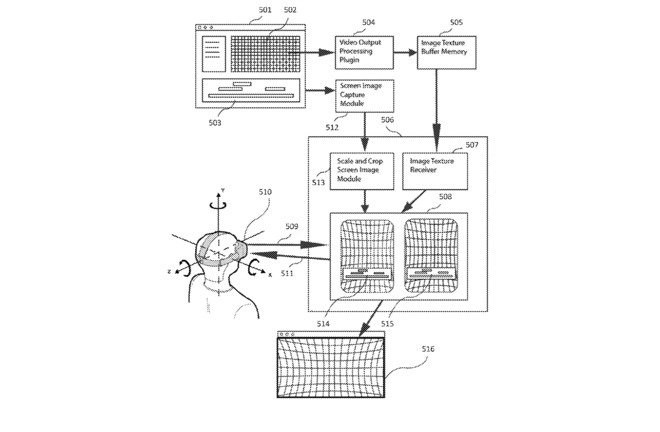

Apple Exploring 360-degree Full VR Helmet Concept

Patent application 15/485,804 was made public on Wednesday, and addresses dynamic modification of images, to present it, and relevant text-based data, to a user in real-time. The patent application is applicable to static and moving images, both in a limited field of view, and encompassing all of the X, Y, and Z axes for a full panorama of vision.


The patent filing also briefly addresses input lag from the headset. Latency between a user's motion and image movement on the head-mounted display can cause motion sickness in some users, so Apple, amongst others, try to keep it to a minimum.


Few actual technical details are present in the patent application, as is the case with most patents. Wile DirectX 11 controls are mentioned, Apple's implementation in the patent relies on OpenGL and Metal, and both routines use of SpriteKit, Core Animation, and Core Graphics.


Beyond the Metal and specific routines mentioned in the patent filing, it it not immediately clear how the patent application differs from others by Facebook's Oculus, and other companies.


The application makes no mention of ARKit at all. This isn't Apple's first foray into virtual reality, as it suggested developers focus on full VR when it announced eGPU support coming to High Sierra.


Source: appleinsider

Windows
Mac OS
iOS
Linux
3uTools
Win 64-bit For this device
V9.0 2025-11-11
Download
Win 32-bit For this device
V9.0 2025-11-11
Download
3uTools
Intel Chip How to Identify Chip Type
V9.0 2025-12-02
Download
Apple Silicon
V9.0 2025-12-02
Download
How to Identify Chip Type
1.  Click the Apple icon in the top-left corner of the screen and select About This Mac.
2.  Check the Processor or Chip field to determine if it is "Intel" or "Apple".
Please use the 3uTools PC client to install the iOS client:
1、 Install either the Windows or Mac version of 3uTools on your computer
2、 Open the PC client and connect your device to the computer via USB cable
3、 After the connection is successful, wait for the computer to automatically install the mobile app for the device, or locate “Install Mobile App” on the computer and manually click to install.
3uTools
deb file
V3.01 2025-11-20
Download
rpm file
V3.01 2025-11-20
Download
Windows
Windows
iOS
iOS
Android
Android
TV
TV
3uAirPlayer
Win 64-bit For this device
V6.0.2 2025-11-19
Download
Win 32-bit For this device
V6.0.2 2025-11-19
Download
iOS Device Mirroring (No App Required)
1、 Install 3uAirPlayer on the Windows PC
2、 Open Control Center and select Screen Mirroring
3、 From the list, choose your PC to start mirroring
4、 Or connect your iOS device to the PC via USB to begin mirroring
Scan to get "3uAirPlayer" App
3uAirPlayer TV V1.0.18
2025-11-28
TV System Requirements: Android 7.0 or later
Download the TV installation package, copy it to a USB drive, insert it into your TV or set-top box, then select the file from the home screen to install.




