NEWS

Apple and LG Team Up for Foldable iPhone

10/12/2017

5221

Apple and LG Team Up for Foldable iPhone


LG is reportedly in business with Apple to develop a foldable iPhone.


A South Korean news site, citing unnamed industry sources, said LG has two separate teams working on key components for a flexible handset that could debut by 2020.


The supposed partnership was reported Wednesday in The Investor blog of The Korea Herald. The report also said Apple sidestepped Samsung Electronics, which currently supplies the OLED screen for the iPhone X, to avoid its main competitor from stealing technology for its own smartphones.


LG Display appointed a team to work on a flexible OLED screen. Its sister company, parts maker LG Innotex, also has a team to work on a design for an RFPCB, or rigid flexible printed circuit board, the unnamed sources said.


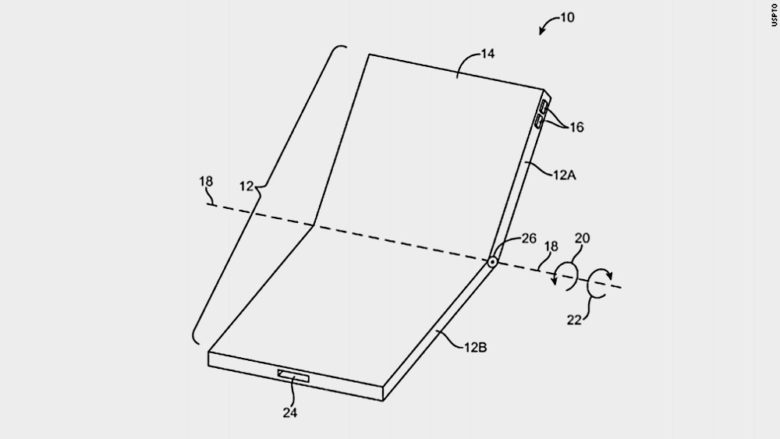
Apple is considering investing in an LG plant to ramp up OLED production, the report said. Apple was granted a U.S. patent for a foldable, flexible screen last year.


Samsung is said to be coming out with a foldable phone sometime next year. LG has been working on a foldable OLED panel prototype for a couple of years and continues to tinker with it to improve durability, the report said.


Source: cult of mac

Windows
Mac OS
iOS
Linux
3uTools
Win 64-bit For this device
V9.0 2025-11-11
Download
Win 32-bit For this device
V9.0 2025-11-11
Download
3uTools
Intel Chip How to Identify Chip Type
V9.0 2025-12-02
Download
Apple Chip
V9.0 2025-12-02
Download
How to Identify Chip Type
1.  Click the Apple icon in the top-left corner of the screen and select About This Mac.
2.  Check the Processor or Chip field to determine if it is "Intel" or "Apple".
Please use the 3uTools PC client to install the iOS client:
1、 Install either the Windows or Mac version of 3uTools on your computer
2、 Open the PC client and connect your device to the computer via USB cable
3、 After the connection is successful, wait for the computer to automatically install the mobile app for the device, or locate “Install Mobile App” on the computer and manually click to install.
3uTools
deb file
V3.01 2025-11-20
Download
rpm file
V3.01 2025-11-20
Download
Windows
Windows
iOS
iOS
Android
Android
TV
TV
3uAirPlayer
Win 64-bit For this device
V6.0.2 2025-11-19
Download
Win 32-bit For this device
V6.0.2 2025-11-19
Download
iOS Device Mirroring (No App Required)
1、 Install 3uAirPlayer on the Windows PC
2、 Open Control Center and select Screen Mirroring
3、 From the list, choose your PC to start mirroring
4、 Or connect your iOS device to the PC via USB to begin mirroring
Scan to get "3uAirPlayer" App
3uAirPlayer TV V1.0.18
2025-11-28
TV System Requirements: Android 7.0 or later
Download the TV installation package, copy it to a USB drive, insert it into your TV or set-top box, then select the file from the home screen to install.