 NEWS
NEWS
Meet You At the Apple...Town Square?
 09/14/2017
 3986
3986
Apple is well-known for inventing new marketing terms. The latest? Apple Stores are now Town Squares.
The iPhone X, iPhone 8 and 8 Plus, Apple Watch Series 3, and Apple TV 4K were the stars of Apple's big media event yesterday, but the Cupertino tech giant also shared some updates for what it deems its "largest products"—its retail stores.
Speaking on stage at the new Steve Jobs Theater, Apple's senior vice president of retail and online stores, Angela Ahrendts, said the company no longer calls its retail stores "stores." Apple now refers to them as "town squares."
Going forward, Apple wants its stores to be places where people can "relax, meet up with friends, or just listen to a local artist on the weekends," Ahrendts said. Larger stores have quieter areas called a Boardroom where people can go for business meetings. The "Genius Grove," centrally located in the company's largest stores, offers a more relaxed environment than the Genius Bars of today.
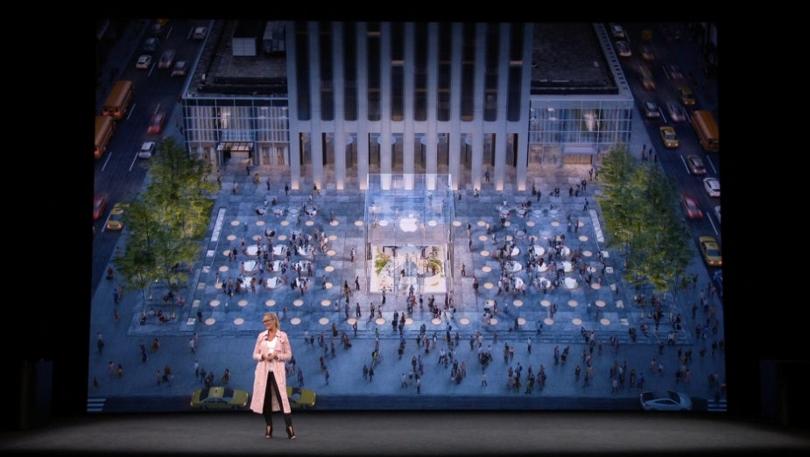
Ahrendts said 500 million people visit Apple retail locations each year. They're "places where everyone's welcome," she said.
Cupertino is gearing up to open its newest store, located on North Michigan Avenue in Chicago, on Oct. 20. There will also be a store inside a visitors center at the company's massive new Cupertino headquarters.
In New York City, Apple plans to revamp its iconic Fifth Ave store, where it will be "opening up the plaza, to allow natural sunlight to come in into a greatly expanded space below," Ahrendts said. Apple is also restoring a historic building on the Avenue des Champs-Élysées in Paris, transforming a theater beneath Piazza Liberty in Milan and restoring Carnegie Library in Washington, D.C.
"Apple retail has always been about more than selling," Apple CEO Tim Cook said during the event. "It's about learning, inspiring, and connecting with people."
Source: pcmag










