 NEWS
NEWS
Apple Granted A Patent Relating to Sleep Onset Latency
 06/28/2017
 3076
3076
Back in February 2014 Apple hired sleep research expert Roy J.E.M. Raymann from Phillips for their iWatch team. Before joining Apple, Raymann served as a senior scientist at Philips Research working as a lead on various sleep related research projects. He founded the Philips Sleep Experience Laboratory, a non-clinical sleep research facility, and also led projects researching various aspects of sleep and activity monitoring. Today Apple was granted a patent titled "Adjusting alarms based on sleep onset latency," where Roy Raymann is listed as the leading inventor.
Apple notes that most people require a certain amount of sleep at night to feel well rested the following day. Often, when a person works, the person will set an alarm to wake them up at an appropriate time so that they can arrive at work on time. To get sufficient sleep, the person will go to bed at a time that allows for an appropriate amount of sleep (e.g., 7 hours, 8 hours, etc.). However, most people do not fall asleep right away when they go to bed. So, even if the person goes to bed at an appropriate time to provide 8 hours of sleep, the person often only ends up with 6 or 7 hours of sleep when the alarm goes off in the morning.
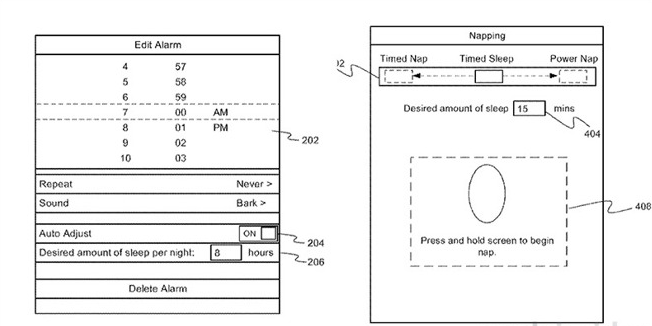
In some implementations of Apple's granted patent, a mobile device can adjust an alarm setting based on the sleep onset latency duration detected for a user of the mobile device. For example, sleep onset latency can be the amount of time it takes for the user to fall asleep after the user attempts to go to sleep (e.g., goes to bed). The mobile device can determine when the user intends or attempts to go to sleep based on detected sleep ritual activities. Sleep ritual activities can include those activities a user performs in preparation for sleep. The mobile device can determine when the user is asleep based on detected sleep signals (e.g., biometric data, sounds, etc.). In some implementations, the mobile device can determine recurring patterns of long or short sleep onset latency and present suggestions that might help the user sleep better or feel more rested.
Particular implementations provide at least the following advantages: the mobile device can help the user feel more rested by automatically adjusting an alarm or suggesting an earlier bedtime based on the determined sleep onset latency to ensure that the user gets enough sleep; the mobile device can automatically determine sleep onset latency using various sensors of the mobile device; the mobile device can automatically identify sleep patterns that may be adversely affecting the user.
The patent notes that it monitors biometrics in the form of breathing rate, heart rate, breathing sounds and movements and more.
Source: patentlyapple










