 NEWS
NEWS
iPhone 8’s Final Design May Have Just Been Confirmed By A New Screen Protector Leak
 06/23/2017
 4264
4264
With WWDC now long behind us, the next big event on Apple’s schedule is the introduction of the highly anticipated iPhone 8. If history is any indication, Apple’s iPhone 8 unveiling will take place sometime in September with a massive launch set to take place shortly thereafter. This year, Apple will reportedly introduce three new iPhone models; an iPhone 7s, iPhone 7s Plus, and the iPhone 8. Nonetheless, it goes without saying that the iPhone 8 will be the star of the show.
At this point, it’s a safe bet that the iPhone 8 design is already finalized, as evidenced by the proliferation of leaks from case manufacturers. In a similar vein, we’ve also seen a number of iPhone 8 screen protector leaks which purport to be based on Apple’s final iPhone 8 design.
One such leak surfaced this past Friday and corroborates earlier reports that the iPhone 8 design will essentially consist of one giant piece of glass. While we’ll know the exact measurements this fall, rumor is that the bezels on the iPhone 8 will check it at just 4mm all round.
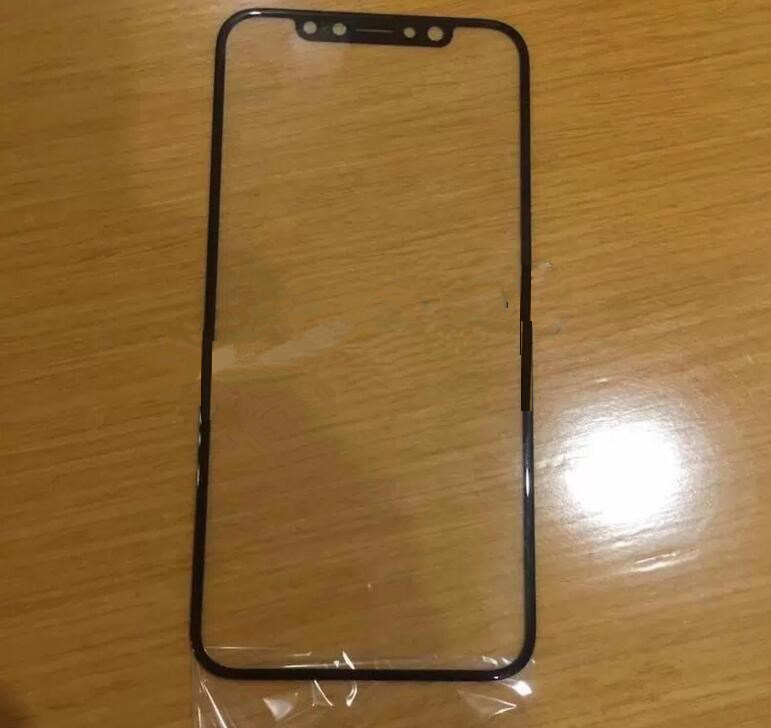
As evidenced above, the slew of camera cutouts on the front face of the display will include a front-facing camera for selfies and video along with a number of cameras that will reportedly be used for biometric identification. Recall that Apple earlier this year acquired an Israeli company called RealFace whose facial recognition technology is said to be so accurate and secure that it can be used to authenticate secure transactions such as money transfers.
While most of the hype surrounding the iPhone 8 naturally centers on its display, it’s worth noting that Apple’s next-gen smartphone may very well be a huge technological leap forward for a number of other reasons as well, including wireless charging support and much-improved battery life.
Source: bgr










