
NEWS

Teens Love Their iPhones More Than Ever

04/11/2017

3710

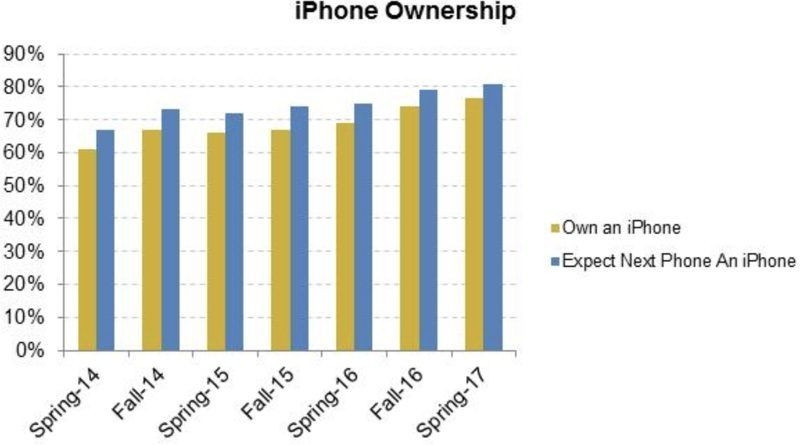
The iPhone has never been more popular with teens, according to a new survey that found 76 percent of U.S. teenagers with a smartphone own an Apple.


Investment firm Piper Jaffray’s semiannual teen survey discovered that iPhone ownership among teenagers rose seven points from spring 2016, when 69 percent of U.S. teens owned an iPhone. The news gets even better for Apple — 81 percent of teens surveyed say they plan to buy an iPhone the next time they upgrade.

Teens Love Their iPhones More Than Ever


This time last year, only 75 percent of the 5,500 teens surveyed said they planned to buy an iPhone. Piper Jaffray credits the rise in anticipation among buyers to the hype surrounding the 10th anniversary iPhone set to be unveiled this fall.


“Apple continued to grow smartphone share among teens with 76% of teens owning an iPhone vs 74% in Fall-16,” the company wrote. “We view the survey as a positive data point on iPhone 7 demand and excitement around the upcoming launch of the 10th anniversary iPhone (iPhone X).”

Teens Love Their iPhones More Than Ever


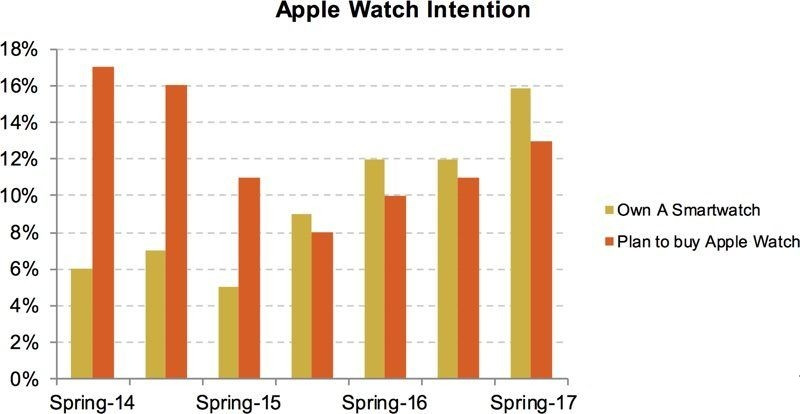
Teens’ interest in smartwatches is also ticking upward. Of the teens surveyed, 13 percent said they plan to buy an Apple Watch, up from 11 percent last year. Fitbit is still the most popular smartwatch brand among teens, though, with 71 percent saying they plan to buy one of Fitbit’s trackers within the next six months. Apple Watch came in second place with 10 percent, and Nike scored a close third with 9 percent of teens lusting after its wearables.


Source: cult of mac


Windows
Mac OS
iOS
Linux
3uTools
Win 64-bit For this device
V9.0 2025-11-11
Download
Win 32-bit For this device
V9.0 2025-11-11
Download
3uTools
Intel Chip How to Identify Chip Type
V9.0 2025-12-02
Download
Apple Silicon
V9.0 2025-12-02
Download
How to Identify Chip Type
1.  Click the Apple icon in the top-left corner of the screen and select About This Mac.
2.  Check the Processor or Chip field to determine if it is "Intel" or "Apple".
Please use the 3uTools PC client to install the iOS client:
1、 Install either the Windows or Mac version of 3uTools on your computer
2、 Open the PC client and connect your device to the computer via USB cable
3、 After the connection is successful, wait for the computer to automatically install the mobile app for the device, or locate “Install Mobile App” on the computer and manually click to install.
3uTools
deb file
V3.01 2025-11-20
Download
rpm file
V3.01 2025-11-20
Download
Windows
Windows
iOS
iOS
Android
Android
TV
TV
3uAirPlayer
Win 64-bit For this device
V6.0.2 2025-11-19
Download
Win 32-bit For this device
V6.0.2 2025-11-19
Download
iOS Device Mirroring (No App Required)
1、 Install 3uAirPlayer on the Windows PC
2、 Open Control Center and select Screen Mirroring
3、 From the list, choose your PC to start mirroring
4、 Or connect your iOS device to the PC via USB to begin mirroring
Scan to get "3uAirPlayer" App
3uAirPlayer TV V1.0.18
2025-11-28
TV System Requirements: Android 7.0 or later
Download the TV installation package, copy it to a USB drive, insert it into your TV or set-top box, then select the file from the home screen to install.




