TUTORIALS

3uTools iDevice Verification: What is Activation Lock and Serial Number Verified

09/19/2018

2415060

3uTools iDevice Verification: What is Activation Lock and Serial Number Verified


What is Activation lock?

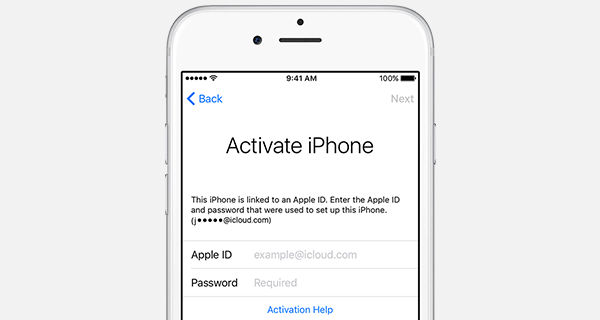
Activation Lock, also named iCloud Lock, is designed to prevent anyone else from using your iOS device if it's ever lost or stolen. Activation Lock is enabled automatically when you turn on Find My iPhone.


If you erase all data or flash the Activation locked device, binding Apple ID account and password are required to activate iOS device. Otherwise, the device is not available.


What is Serial Number Matching?

Serial number is related to sales number or hard disk capacity. If 3uTools detects that serial number of your device is not verified, among the above three items, at lease one item may be changed.


What is Value Verified?

There are five items needed to be verified. iDevices UDID is generated by IMEI number, Serial number, WIi-Fi address and blutetooth address. Thus, if 3uTools detects the value is not verified, at least one item may be modified.


Windows
Mac OS
iOS
Linux
3uTools
Win 64-bit For this device
V9.0 2025-11-11
Download
Win 32-bit For this device
V9.0 2025-11-11
Download
3uTools
Intel Chip How to Identify Chip Type
V9.0 2025-12-02
Download
Apple Chip
V9.0 2025-12-02
Download
How to Identify Chip Type
1.  Click the Apple icon in the top-left corner of the screen and select About This Mac.
2.  Check the Processor or Chip field to determine if it is "Intel" or "Apple".
Please use the 3uTools PC client to install the iOS client:
1、 Install either the Windows or Mac version of 3uTools on your computer
2、 Open the PC client and connect your device to the computer via USB cable
3、 After the connection is successful, wait for the computer to automatically install the mobile app for the device, or locate “Install Mobile App” on the computer and manually click to install.
3uTools
deb file
V3.01 2025-11-20
Download
rpm file
V3.01 2025-11-20
Download
Windows
Windows
iOS
iOS
Android
Android
TV
TV
3uAirPlayer
Win 64-bit For this device
V6.0.2 2025-11-19
Download
Win 32-bit For this device
V6.0.2 2025-11-19
Download
iOS Device Mirroring (No App Required)
1、 Install 3uAirPlayer on the Windows PC
2、 Open Control Center and select Screen Mirroring
3、 From the list, choose your PC to start mirroring
4、 Or connect your iOS device to the PC via USB to begin mirroring
Scan to get "3uAirPlayer" App
3uAirPlayer TV V1.0.18
2025-11-28
TV System Requirements: Android 7.0 or later
Download the TV installation package, copy it to a USB drive, insert it into your TV or set-top box, then select the file from the home screen to install.