
TUTORIALS

This Tweak Puts a Free RAM Indicator in the iPhone X’s Status Bar

08/10/2018

7601

The iPhone X’s notch compelled Apple’s to redesign the handset’s Status Bar to make the best use possible of the free space available. 


A new free jailbreak tweak called FreeRAMUnderTimeX by iOS developer i4M1k0SU. Just as the name suggests, this tweak displays the amount of free RAM you have right under the time indicator in the iPhone X’s Status Bar. The tweak is intended for jailbroken iPhone X handsets only, as it depends on Status Bar design specific to this device. 


iOS automatically regulates your RAM usage for the best performance among your recently-used apps, and with a gracious 3GB of onboard RAM, the iPhone X almost never chokes up in daily usage. Nevertheless, it never hurts to see how much of your RAM isn’t be utilized.
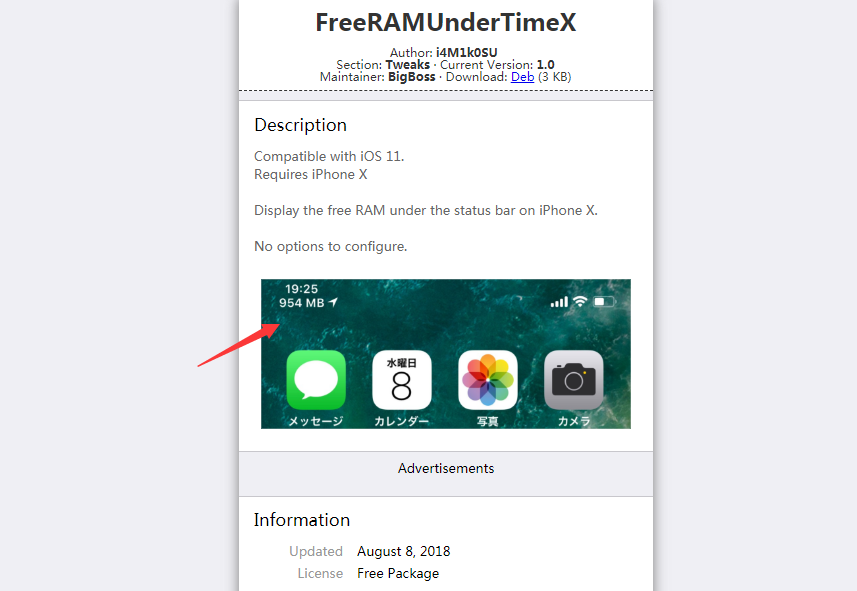

This Tweak Puts a Free RAM Indicator in the iPhone X’s Status Bar


While not everyone enjoys seeing live hardware information on the face of their iPhone, it can be a great addition for more advanced users that like seeing what’s happening behind the scenes. Additionally, it may provide pointers as to why your device runs sluggish at times.


With no options to configure, all you need to do is install FreeRAMUnderTimeX from Cydia and you’re all set. You’ll have to uninstall the tweak from Cydia if you ever want to disable it.


If you’re interested in trying FreeRAMUnderTimeX, then you can download it for free from Cydia’s BigBoss repository 


Source: idownloadblog

Windows
Mac OS
iOS
Linux
3uTools
Win 64-bit For this device
V9.05 2026-03-28
Download
Win 32-bit For this device
V9.05 2026-03-28
Download
3uTools
Intel Chip How to Identify Chip Type
V9.03 2026-03-27
Download
Apple Silicon
V9.03 2026-03-27
Download
How to Identify Chip Type
1.  Click the Apple icon in the top-left corner of the screen and select About This Mac.
2.  Check the Processor or Chip field to determine if it is "Intel" or "Apple".
Please use the 3uTools PC client to install the iOS client:
1、 Install either the Windows or Mac version of 3uTools on your computer
2、 Open the PC client and connect your device to the computer via USB cable
3、 After the connection is successful, wait for the computer to automatically install the mobile app for the device, or locate “Install Mobile App” on the computer and manually click to install.
3uTools
deb file
V3.01 2025-11-20
Download
rpm file
V3.01 2025-11-20
Download
Windows
Windows
iOS
iOS
Android
Android
TV
TV
3uAirPlayer
Win 64-bit For this device
V6.0.3 2026-03-11
Download
Win 32-bit For this device
V6.0.3 2026-03-11
Download
iOS Device Mirroring (No App Required)
1、 Install 3uAirPlayer on the Windows PC
2、 Open Control Center and select Screen Mirroring
3、 From the list, choose your PC to start mirroring
4、 Or connect your iOS device to the PC via USB to begin mirroring
Scan to get "3uAirPlayer" App
3uAirPlayer TV V1.0.18
2025-11-28
TV System Requirements: Android 7.0 or later
Download the TV installation package, copy it to a USB drive, insert it into your TV or set-top box, then select the file from the home screen to install.




