 TUTORIALS
All iOS 10-10.3.3 Exploits Explained + Jailbreak Progress So Far
 03/02/2018
 7283
7283
There are plenty of iOS 10 jailbreak exploits floating around on the interwebs, yet a jailbreak eludes us. Here’s an in-depth explanation of all exploits for iOS 10-10.3.3 and jailbreak progress so far.
iOS 10-10.3.3 Exploits
Here’s a list of all iOS 10 exploits that are publicly available for developers to use.
Although there are plenty of other exploits as well, I have omitted them for the sake of simplicity. iOS 10-10.2 users can already use yalu jailbreak so there’s no point in including them here.
Triple_fetch
triple_fetch is yet another exploit by Google Project Zero’s Ian Beer. It is compatible with all iOS 10 versions up to 10.3.2.
It is based on a race condition and has an extremely low success rate. Saigon (beta version) utilizes this very exploit, which explains why it fails every time.
Compatibility – 10-10.3.2
ziVA
ziVA is an exploit based on an Apple media driver vulnerability. It is developed by Adam Donenfeld of Zimperium labs.
It is currently present in the older version of Saigon and is unusable on iOS 10.3.2 and 10.3.3.
Compatibility – 10-10.3.1
v0rtex
v0rtex is an iOS 10 exploit that is based on a UaF port vulnerability in iOS kernel. It is developed by German hacker Siguza.
This is the most powerful exploit for this firmware and is compatible with each and every version. Moreover, the upcoming iOS 10.3.3 jailbreak will utilize it.
For the uninitiated, v0rtex has already been used in Saigon (iOS 10.2.1 jailbreak) to make it more stable.
Compatibility – 10-10.3.3
AMFI patch
AMFI patch is the latest exploit for iOS 10.3.3. It is developed by PsychoTea. It’s a backport of iOS 11’s codesigning bypass and is currently responsible for SSH access.
Compatibility – 10.3.3
Jailbreak progress so far
Who is working on an iOS 10.3.3 jailbreak?
Despite what people think, Siguza is not working on an iOS 10.3.3 jailbreak. His work (so far) is limited to only finding the exploit for iOS 10 but that could change in the future.
An unknown developer, who goes by the name PsychoTea, is currently working on a jailbreak for iOS 10.3.3 and below. He has so far achieved the following on iOS 10 –
Kernel read/write access
Read/write permissions for the root filesystem
SSH access
AMFI patch (Codesigning bypass)
Here’s a screenshot of SSH access on iOS 10.3.3 firmware.
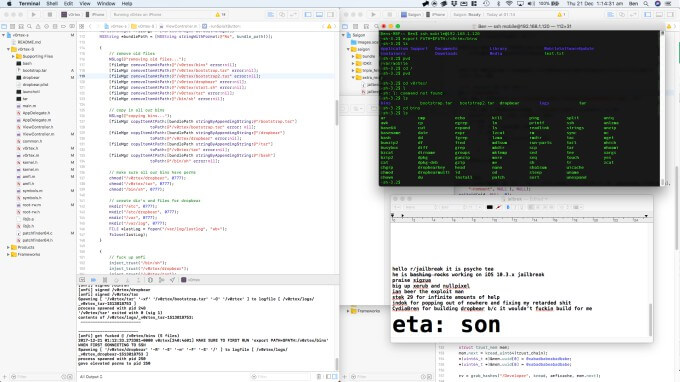
This is comparable to everything that we now have for iOS 11 firmware and we are not too far behind.
German hacker Tihmstar is also working on an iOS 10.3.3 jailbreak. However, this tool will remain limited to 32-bit devices only. He recently also showed off his iPhone 5 running Cydia so a release is imminent.









