
TUTORIALS

This Tweak Brings the iOS 11 Notification Centre to Jailbroken iOS 10

10/13/2017

4663

iOS 11 brings with it a whole host of changes, and one of the most notable right off the bat is the updated look and feel for Notification Center. Unfortunately for jailbreakers, upgrading is out of the question.


If you fall into that category, then new free jailbreak tweak dubbed NotificationCenterXI (iOS 10) by iOS developer LaughingQuoll might interest you. It ports the iOS 11 Notification Center experience to jailbroken devices, allowing jailbreakers to have their cake and eat it too.
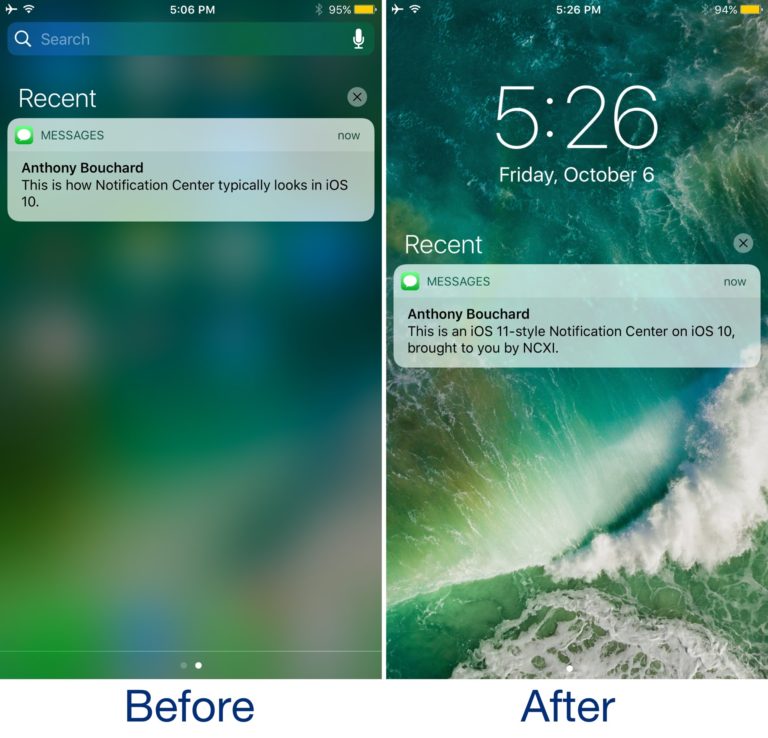

This Tweak Brings the iOS 11 Notification Centre to Jailbroken iOS 10


Once installed, Notification Center begins to look how it does above, revealing your wallpaper in the background of everything rather than a blur designed to separate your attention from the rest of the iOS interface.


As you’ve probably already discerned, iOS 11’s Notification Center looks and feels a lot like the Lock screen interface. NotificationCenterXI takes that into account, so what you see is a copycat of the iOS 11 Lock screen interface as your Notification Center.


And it doesn’t stop at the notifications page; scrolling to the left where all your widgets are located will yield similar cosmetics:
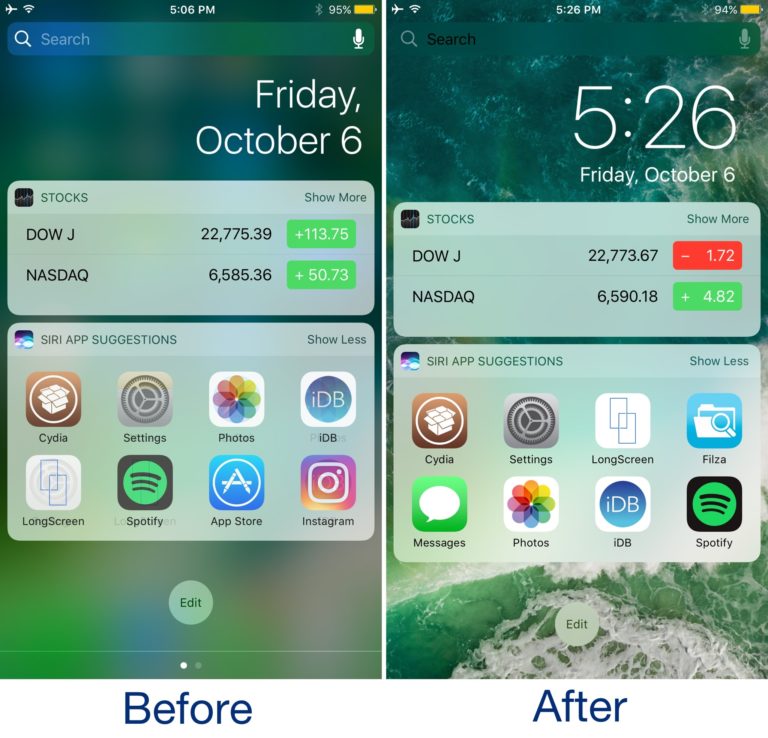

This Tweak Brings the iOS 11 Notification Centre to Jailbroken iOS 10


Some smaller, fine-grained details in NotificationCenterXI mimic the iOS 11 experience as well, such as the differences in the date and time displays and the subtle animations you’ll enjoy as you launch and dismiss Notification Center with a flick of your finger.


Source: idownloadblog

Windows
Mac OS
iOS
Linux
3uTools
Win 64-bit For this device
V9.01 2025-12-27
Download
Win 32-bit For this device
V9.01 2025-12-27
Download
3uTools
Intel Chip How to Identify Chip Type
V9.01 2025-12-31
Download
Apple Silicon
V9.01 2025-12-31
Download
How to Identify Chip Type
1.  Click the Apple icon in the top-left corner of the screen and select About This Mac.
2.  Check the Processor or Chip field to determine if it is "Intel" or "Apple".
Please use the 3uTools PC client to install the iOS client:
1、 Install either the Windows or Mac version of 3uTools on your computer
2、 Open the PC client and connect your device to the computer via USB cable
3、 After the connection is successful, wait for the computer to automatically install the mobile app for the device, or locate “Install Mobile App” on the computer and manually click to install.
3uTools
deb file
V3.01 2025-11-20
Download
rpm file
V3.01 2025-11-20
Download
Windows
Windows
iOS
iOS
Android
Android
TV
TV
3uAirPlayer
Win 64-bit For this device
V6.0.2 2025-11-19
Download
Win 32-bit For this device
V6.0.2 2025-11-19
Download
iOS Device Mirroring (No App Required)
1、 Install 3uAirPlayer on the Windows PC
2、 Open Control Center and select Screen Mirroring
3、 From the list, choose your PC to start mirroring
4、 Or connect your iOS device to the PC via USB to begin mirroring
Scan to get "3uAirPlayer" App
3uAirPlayer TV V1.0.18
2025-11-28
TV System Requirements: Android 7.0 or later
Download the TV installation package, copy it to a USB drive, insert it into your TV or set-top box, then select the file from the home screen to install.




