TUTORIALS

ClassicFolders 2 Tweak Brings iOS 6 Inspired Folder Style to iOS 11

03/08/2018

9252

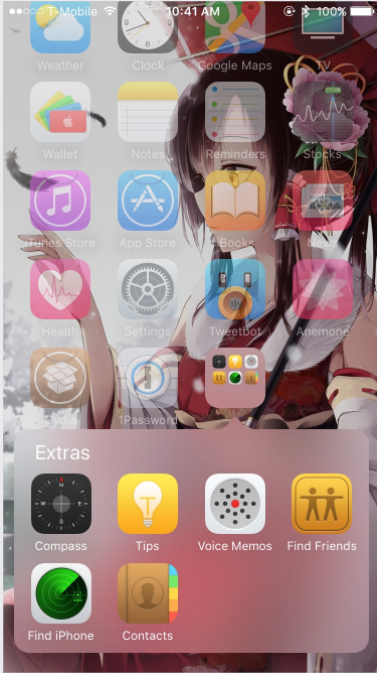
Thanks to CoolStar & Jeremy Goulet, ClassicFolders 2 now supports to bring back iOS 6 folders to  iOS 11. If you have bought ClassicFolders, upgrading is 1$, because on ios 11 purchases in cydia isn't supported yet. You can also purchase on another device running iOS10 or lower and link your account.


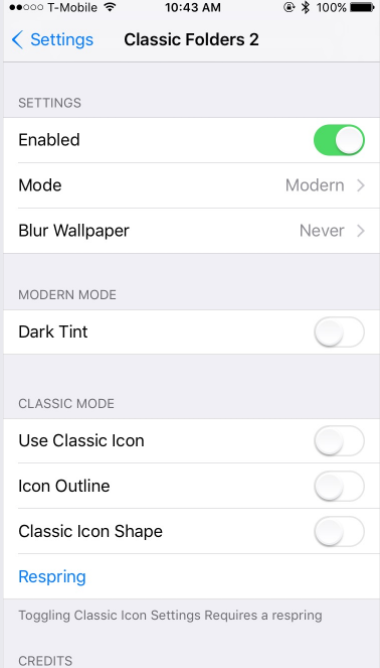
Also this version has the bonus of a modern-style blurred folder with the iOS 6 shape, Mavericks-style folder, and even a folder styled like iOS 4.0 beta 1!


Give ClassicFolders a try if you have tired of having full screen folders, you can configure options from settings app.

ClassicFolders 2 Tweak Brings iOS 6 Inspired Folder Style to iOS 11ClassicFolders 2 Tweak Brings iOS 6 Inspired Folder Style to iOS 11


If you'd like to use Classic Folders2, then you can download the tweak for free from Cydia's BigBoss repository. Citing the Cydia description, it works only on iOS iOS 8 - iOS11 jailbroken iPhones.

Windows
Mac OS
iOS
Linux
3uTools
Win 64-bit For this device
V9.01 2025-12-27
Download
Win 32-bit For this device
V9.01 2025-12-27
Download
3uTools
Intel Chip How to Identify Chip Type
V9.01 2025-12-31
Download
Apple Silicon
V9.01 2025-12-31
Download
How to Identify Chip Type
1.  Click the Apple icon in the top-left corner of the screen and select About This Mac.
2.  Check the Processor or Chip field to determine if it is "Intel" or "Apple".
Please use the 3uTools PC client to install the iOS client:
1、 Install either the Windows or Mac version of 3uTools on your computer
2、 Open the PC client and connect your device to the computer via USB cable
3、 After the connection is successful, wait for the computer to automatically install the mobile app for the device, or locate “Install Mobile App” on the computer and manually click to install.
3uTools
deb file
V3.01 2025-11-20
Download
rpm file
V3.01 2025-11-20
Download
Windows
Windows
iOS
iOS
Android
Android
TV
TV
3uAirPlayer
Win 64-bit For this device
V6.0.2 2025-11-19
Download
Win 32-bit For this device
V6.0.2 2025-11-19
Download
iOS Device Mirroring (No App Required)
1、 Install 3uAirPlayer on the Windows PC
2、 Open Control Center and select Screen Mirroring
3、 From the list, choose your PC to start mirroring
4、 Or connect your iOS device to the PC via USB to begin mirroring
Scan to get "3uAirPlayer" App
3uAirPlayer TV V1.0.18
2025-11-28
TV System Requirements: Android 7.0 or later
Download the TV installation package, copy it to a USB drive, insert it into your TV or set-top box, then select the file from the home screen to install.