 NEWS
NEWS
Potential Benchmark for iPhone XR Successor Shows 4GB RAM, Moderate Performance Gains
 09/04/2019
 3249
3249
A new Geekbench result posted this evening purportedly reveals performance data for the next-generation iPhone XR set to debut at next week's media event.
The result, spotted by forum member EugW, lists a model number of "iPhone12,1" running iOS 13.1 with a motherboard identifier of N104AP. Back in May, Bloombergreported that the next-generation iPhone XR was internally codenamed N104, while 9to5Mac reported in July that the device would carry the model number iPhone12,1. 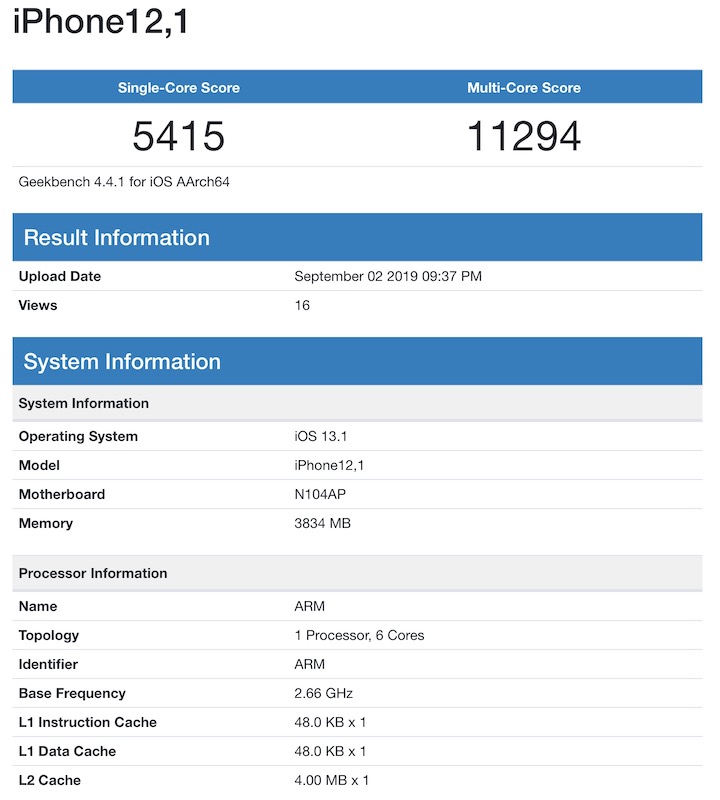
If legitimate, the result reveals a few details about the iPhone XR successor and its A13 chip. First, the result shows approximately 4 GB of RAM for the device, which would be an increase over the 3 GB found in the current iPhone XR and in line with predictions from noted analyst Ming-Chi Kuo. The iPhone XS and XS Max already include 4 GB of RAM, and there have not been any solid rumors suggesting their successors will see an increase.
Moving on to the A13 itself, the result indicates it continues to include six cores, presumably in an identical setup compared to the A12 with two high-performance cores and four high-efficiency cores.
The A13's high-performance cores are shown running at 2.66 GHz in today's result, compared to 2.49 GHz in the A12, leading to an approximately 12–13 percent gain in single-core performance for the A13 with a score of 5415, compared to an average 4796 for the A12 in the iPhone XR.
Interestingly, the A13's multi-core score of 11294 is nearly identical to the A12's average score of 11192, although Geekbench's developer John Poole tells us there could be some throttling due to thermal limits as similar situations have been seen with the A12 in the iPhone XS and XR, so we may have to wait for more data to see where the A13 truly tops out.
Careful observers will note oddly low figures for the L1 and L2 caches on this A13, but Poole tells us Geekbench has difficulty telling whether the cache values it reads are for the high-performance or high-efficiency cores, particularly on unreleased hardware for which the software hasn't been optimized.
While we can't confirm whether the Geekbench result is legitimate, as results certainly can be faked, all of the data appears reasonable or explainable and Poole tells us "there's nothing obviously wrong with the result."
We'll know more with the unveiling of all three of the new iPhones at Apple's media event on September 10, although Apple is unlikely to share specifics on chip speeds and RAM amounts. It won't take long, however, for additional data to surface confirming specs for the new devices.
Source: MacRumors










