NEWS

Thrilling iPhone 11 Video Shows Off All the Rumored Features

04/30/2019

2671

Thrilling iPhone 11 Video Shows Off All the Rumored Features


A new video wraps up all the unconfirmed reports about Apples next handset. And there’s a lot to work with. Details about the iPhone 11 have been leaking out steadily, even though the launch is still half a year away.


Watch it now:


This video was created by Hassan Kaymak for ConceptsiPhone.


A plethora of iPhone 11 rumors


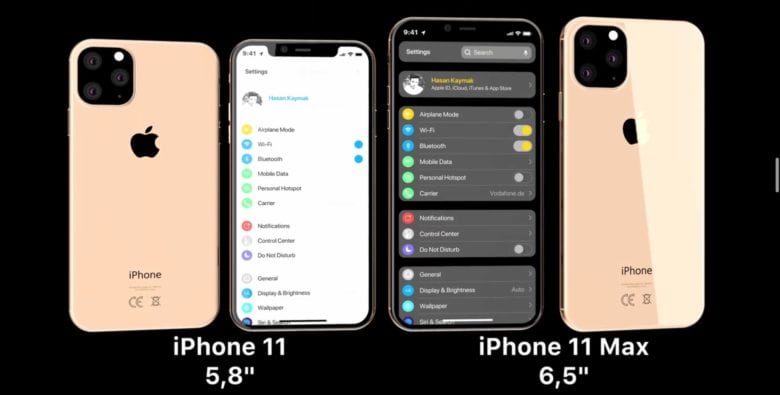
The most obvious change shown is the three-lens camera that’s been in so many rumors about the first iOS 13 handset. This could offer the same telephoto and wide-angle lenses as last year’s iPhone XS series, but with an even more wide angle lens added.


Speaking of cameras, this video includes the 12MP FaceTime camera upgrade from a recent report.


Kaymak also embraced the rumor that the iPhone 11 will include a USB-C port, as the new iPad Pro tablets do. There has been some disagreement about whether this will come to pass, though.


Virtually all sources agree that the 2019 iPhone models will have the same range of display sizes as the current ones. Shown in the video is the iPhone 11 with a 5.8-inch OLED screen as well as the iPhone 11 MAX with a 6.5-inch OLED. Not shown is the rumored iPhone 11R with a 6.1-inch display.


Source: cult of mac

Windows
Mac OS
iOS
Linux
3uTools
Win 64-bit For this device
V9.01 2025-12-27
Download
Win 32-bit For this device
V9.01 2025-12-27
Download
3uTools
Intel Chip How to Identify Chip Type
V9.01 2025-12-31
Download
Apple Silicon
V9.01 2025-12-31
Download
How to Identify Chip Type
1.  Click the Apple icon in the top-left corner of the screen and select About This Mac.
2.  Check the Processor or Chip field to determine if it is "Intel" or "Apple".
Please use the 3uTools PC client to install the iOS client:
1、 Install either the Windows or Mac version of 3uTools on your computer
2、 Open the PC client and connect your device to the computer via USB cable
3、 After the connection is successful, wait for the computer to automatically install the mobile app for the device, or locate “Install Mobile App” on the computer and manually click to install.
3uTools
deb file
V3.01 2025-11-20
Download
rpm file
V3.01 2025-11-20
Download
Windows
Windows
iOS
iOS
Android
Android
TV
TV
3uAirPlayer
Win 64-bit For this device
V6.0.2 2025-11-19
Download
Win 32-bit For this device
V6.0.2 2025-11-19
Download
iOS Device Mirroring (No App Required)
1、 Install 3uAirPlayer on the Windows PC
2、 Open Control Center and select Screen Mirroring
3、 From the list, choose your PC to start mirroring
4、 Or connect your iOS device to the PC via USB to begin mirroring
Scan to get "3uAirPlayer" App
3uAirPlayer TV V1.0.18
2025-11-28
TV System Requirements: Android 7.0 or later
Download the TV installation package, copy it to a USB drive, insert it into your TV or set-top box, then select the file from the home screen to install.