 NEWS
NEWS
iPhone 11 Max CAD Renders Offer up 360-degree Video and iPhone 11 Comparisons
 04/28/2019
 2930
2930
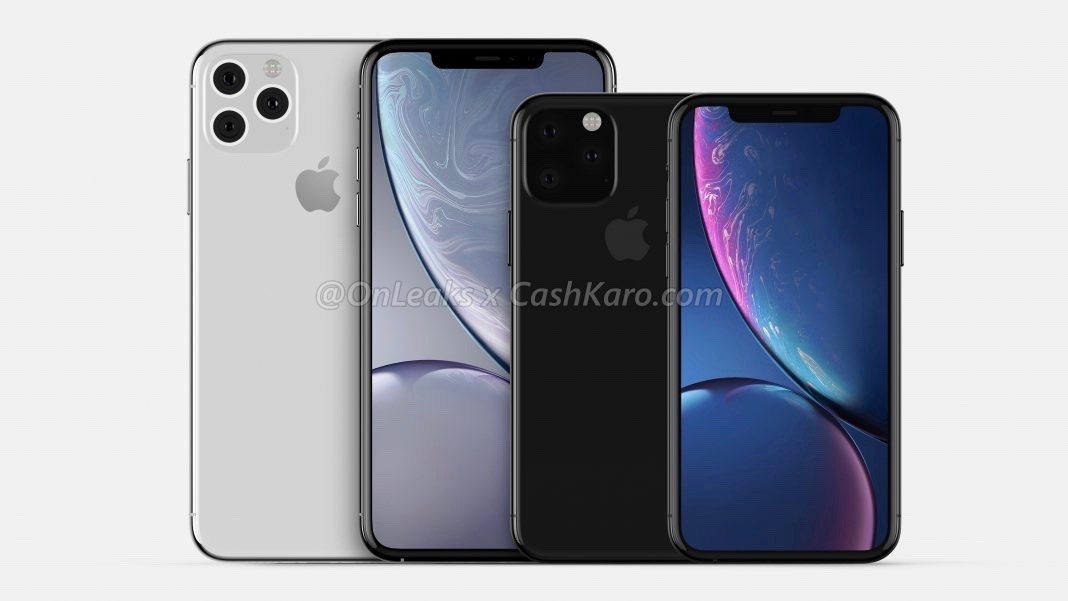
Yesterday, we learned a little more about what the iPhone 11 could offer with a new back glass, mute switch, and more. We also saw some rough 3D printed models of the 2019 iPhones. Today, CashKaroand OnLeaks are out with more CAD-based renders comparing the iPhone 11 to the iPhone 11 Max, as well as offering up a 360-degree video of the larger 2019 iPhone.
Today’s news includes renders of what is expected to be the 6.5-inch iPhone 11 Max with the new back glass design. It is believed to seamlessly incorporate the new triple-camera system module into the rear glass like the 5.8-inch iPhone 11. From yesterday’s CashKaro report:
"Talking about other aspects of the leaked images, we can see that the device comes with a new and unique rear panel which is made of a single piece of glass including the camera bump."
The CAD renders of the iPhone 11 Max also show off the updated mute switch, a change from the current oblong-shaped design to a circular one, which will also operate up and down, compared to left and right.
The iPhone 11 Max renders are shown off in silver/white, with the new triple-camera system being much more noticeable in the light color. The iPhone 11 Max will reportedly measure a bit thicker than the iPhone 11 at 9.3mm compared to 9mm, respectively (including the camera module).
"We have also been informed that the dimensions of the upcoming Max device will measure nearly 157.6 x 77.5 x 8.1mm (9.3mm, including rear camera bump)."

As for the display, the bezels are expected to be remain more or less the same as the iPhone XS and XS Max.

There’s not much else new at this point, however, OnLeaks noted on Twitter that more details will be “coming soon.” Check out the video below for a 360-degree look at the iPhone 11 Max render that we saw yesterday.
Source: 9to5mac










