NEWS

Chimp Scrolling Instagram on iPhone Proves it’s just Like Us

04/26/2019

2615

Chimp Scrolling Instagram on iPhone Proves it’s just Like Us


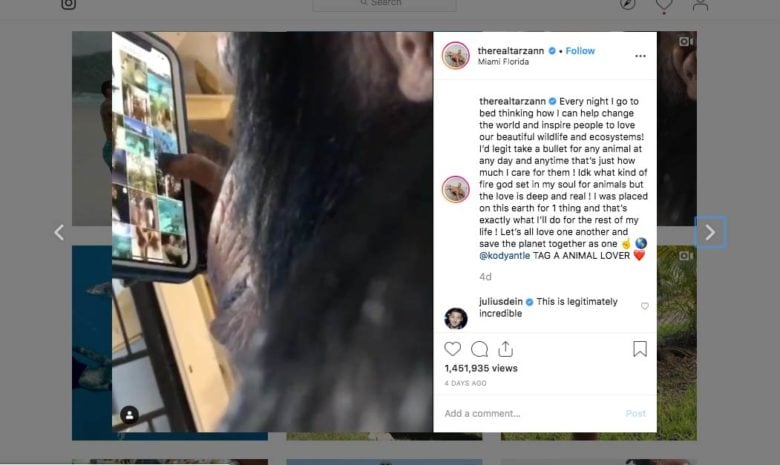
Unique animals get a lot of attention on social media, and the latest example is a savvy chimpanzee intentionally browsing Instagram on iPhone. Head below to check out this chimp that’s gone viral.


Mike Holston (@therealtarzann on Instagram) shared the video of the chimpanzee scrolling, swiping, and browsing Instagram with precision a few days ago. The original post has seen over 1.4 million views, as users across other social media sites like Reddit and Twitter have been reposting the impressive video. Media outlets have begun sharing the video as well.


The video shows the chimp (via Kody Antle) using what looks like an iPhone XS or XS Max with an OtterBox case as he peruses Instagram, and it isn’t just a few random taps on the screen. The chimpanzee is intentionally watching, swiping right to go back, browsing tiled posts, and selecting new posts to look at.


Check out the full one-minute video in Instagram.


Source: 9to5mac

Windows
Mac OS
iOS
Linux
3uTools
Win 64-bit For this device
V9.01 2025-12-27
Download
Win 32-bit For this device
V9.01 2025-12-27
Download
3uTools
Intel Chip How to Identify Chip Type
V9.01 2025-12-31
Download
Apple Silicon
V9.01 2025-12-31
Download
How to Identify Chip Type
1.  Click the Apple icon in the top-left corner of the screen and select About This Mac.
2.  Check the Processor or Chip field to determine if it is "Intel" or "Apple".
Please use the 3uTools PC client to install the iOS client:
1、 Install either the Windows or Mac version of 3uTools on your computer
2、 Open the PC client and connect your device to the computer via USB cable
3、 After the connection is successful, wait for the computer to automatically install the mobile app for the device, or locate “Install Mobile App” on the computer and manually click to install.
3uTools
deb file
V3.01 2025-11-20
Download
rpm file
V3.01 2025-11-20
Download
Windows
Windows
iOS
iOS
Android
Android
TV
TV
3uAirPlayer
Win 64-bit For this device
V6.0.2 2025-11-19
Download
Win 32-bit For this device
V6.0.2 2025-11-19
Download
iOS Device Mirroring (No App Required)
1、 Install 3uAirPlayer on the Windows PC
2、 Open Control Center and select Screen Mirroring
3、 From the list, choose your PC to start mirroring
4、 Or connect your iOS device to the PC via USB to begin mirroring
Scan to get "3uAirPlayer" App
3uAirPlayer TV V1.0.18
2025-11-28
TV System Requirements: Android 7.0 or later
Download the TV installation package, copy it to a USB drive, insert it into your TV or set-top box, then select the file from the home screen to install.