NEWS

Apple Cuts Prices on MacBook Air and Mac Mini SSD Upgrades

03/20/2019

2379


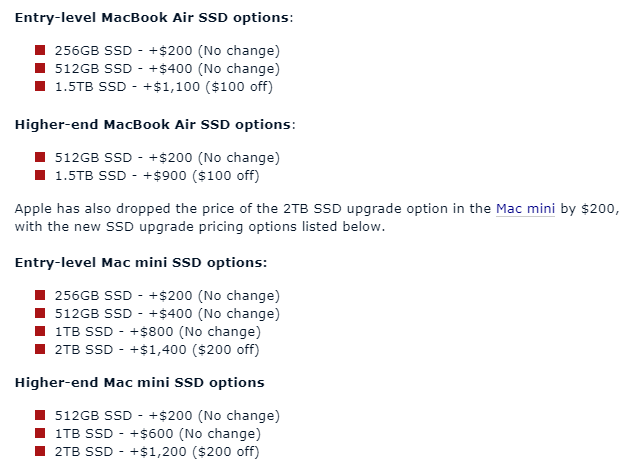
As we reported this morning, Apple today cut the prices of higher-end MacBook Pro SSD upgrades by up to $400, and as it turns out, there have been pricing changes to components in other Mac machines as well. 


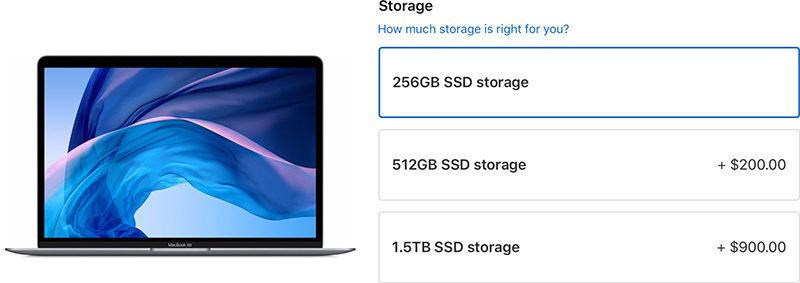
For the MacBook Air, released in 2018, upgrading to a 1.5TB SSD on either base model is now $100 cheaper, with the SSD upgrade pricing options listed below. 
Apple Cuts Prices on MacBook Air and Mac Mini SSD Upgrades

Apple Cuts Prices on MacBook Air and Mac Mini SSD Upgrades


Apple has also quietly dropped the price of the 64GB RAM upgrade in the Mac Pro, which is the 2013 model that has not seen an update in many years. 


Prior to today's update, upgrading the base Mac Pro configurations from 16GB RAM to 64GB Ram cost $1,200, but Apple has dropped the price by $400. It now costs $800 to upgrade from 16GB RAM to 64GB RAM. Upgrading to 32GB RAM continues to cost $400 over the base 16GB option.

Source: macrumors

Windows
Mac OS
iOS
Linux
3uTools
Win 64-bit For this device
V9.01 2025-12-27
Download
Win 32-bit For this device
V9.01 2025-12-27
Download
3uTools
Intel Chip How to Identify Chip Type
V9.01 2025-12-31
Download
Apple Silicon
V9.01 2025-12-31
Download
How to Identify Chip Type
1.  Click the Apple icon in the top-left corner of the screen and select About This Mac.
2.  Check the Processor or Chip field to determine if it is "Intel" or "Apple".
Please use the 3uTools PC client to install the iOS client:
1、 Install either the Windows or Mac version of 3uTools on your computer
2、 Open the PC client and connect your device to the computer via USB cable
3、 After the connection is successful, wait for the computer to automatically install the mobile app for the device, or locate “Install Mobile App” on the computer and manually click to install.
3uTools
deb file
V3.01 2025-11-20
Download
rpm file
V3.01 2025-11-20
Download
Windows
Windows
iOS
iOS
Android
Android
TV
TV
3uAirPlayer
Win 64-bit For this device
V6.0.2 2025-11-19
Download
Win 32-bit For this device
V6.0.2 2025-11-19
Download
iOS Device Mirroring (No App Required)
1、 Install 3uAirPlayer on the Windows PC
2、 Open Control Center and select Screen Mirroring
3、 From the list, choose your PC to start mirroring
4、 Or connect your iOS device to the PC via USB to begin mirroring
Scan to get "3uAirPlayer" App
3uAirPlayer TV V1.0.18
2025-11-28
TV System Requirements: Android 7.0 or later
Download the TV installation package, copy it to a USB drive, insert it into your TV or set-top box, then select the file from the home screen to install.