 NEWS
NEWS
For the First Time in Years, Apple is Hiring More Software People than Hardware People
 03/04/2019
 3124
3124
Apple started as a hardware company. Its first product was a kit: a box of hardware that customers had to assemble on their own. There was no software included. That, again, was up to the customer.
But what eventually differentiated Apple was its user-friendly software that made the hardware disappear. Product design has always been a critical difference-maker for the company — the iPhone's capacitive touchscreen, the iPods simple elegance, the MacBook's slim profile — but as the company looks to the future, it's beginning to look more like a software company than anything.
One could make that point by simply pointing at its burgeoning media business, but the hard truth lies in Apple's job listings data when tracked over time. As of today, "Software and Services" (previously known as Software Engineering) is, for the first time, the most-populous category for which Apple is hiring.
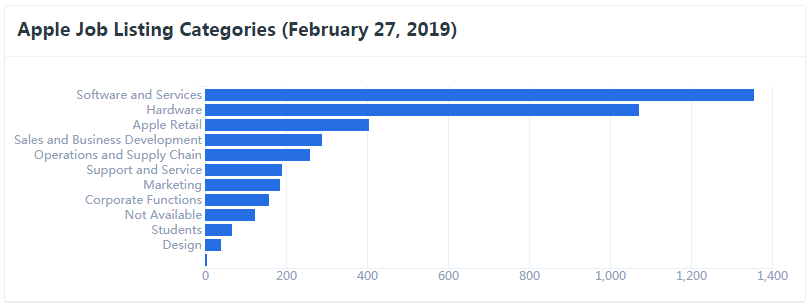
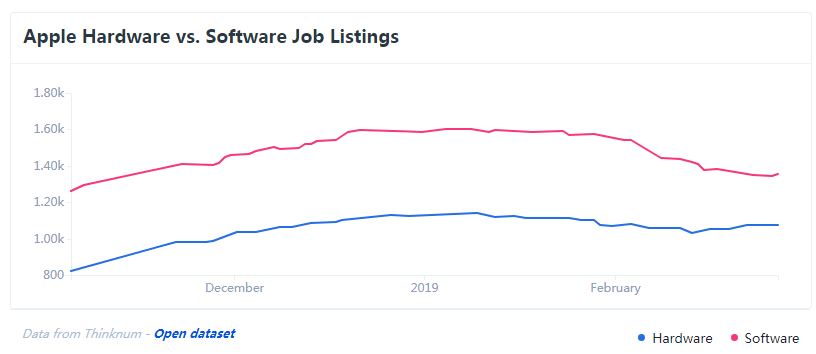
Since 2016, Apple HR's most in-demand job category was always Hardware Engineering. For most of 2016 through 2018, it far outweighed Software by demand.
But in the third quarter of 2018, for the first time, Software Engineers became the most-in-demand professionals at Apple. This coincides with when Apple began talking more about its software and services like Apple Music, a new video streaming service, and a news and editorial subscription service.
It makes sense for Apple: its hardware is now not only ubiquitous, but demand has finally plateaud. At the end of 2018 (right around when Apple began its earnest search for more software people), it became very clear that the iPhone was no longer Apple's meal ticket as sales lagged followed by a very rare warnings call from Tim Cook.
So now what? Lock people into the ecosystem with software and services. How to get there? Hire people who know how to build that walled garden.
Source: thinknum










