 NEWS
NEWS
Rumored 'Jet White' iPhone 7 Mockup Shown Off in Video
 12/28/2016
 3591
3591
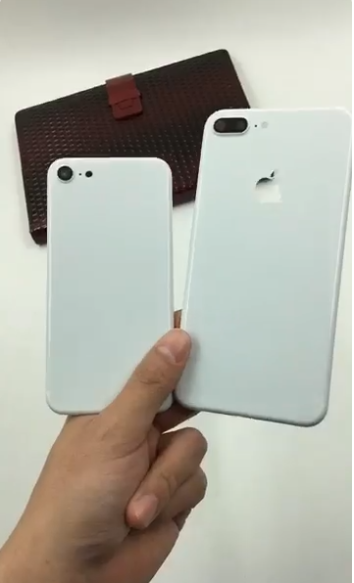
Posted to Twitter by avid Apple leaker Sonny Dickson on Tuesday, the glossy white casings appear to be custom housings sourced from a third-party vendor, likely snapped up on Alibaba or similar Asian marketplace.
While both nearly identical in design to Apple's iPhone 7 series, there are key differences that strongly suggest the casings are mockups and not original hardware. For example, the smaller iPhone 7 model lacks the appropriate Apple logo cutout into which is fitted radio-transparent material.
Less noticeable, but equally important in identifying a fake, is the finish. Both housings in today's video have an eggshell texture that implies the white color was painted or otherwise applied after initial manufacture. By comparison, Apple's Jet Black iPhone achieves its high-gloss finish through a labor-intensive process involving rotational 3D polishing, anodization and an iron particle bath.
Though likely aftermarket parts, the cases do offer a glimpse at a "Jet White" iPhone 7 model promised by rumors in November. At the time, source within Apple's supply chain told Mac Otakara that the company was mulling the release of glossy white iPhone 7 and iPhone 7 Plus variants to go along with popular Jet Black models.
No time window was assigned to the questionable rumor, and the website itself noted the information might be unreliable.
Apple introduced the Jet Black iPhone 7 alongside a matte black version in September. With initially limited availability, the glossy option was a hot item and quickly sold out within hours of launch. Given the company's history with device colors —the first iPods came were white, and the first iPhone was raw aluminum —a glossy white iteration might be on tap for next year's iPhone refresh.
Source: appleinsider










