NEWS

The iPhone Randomly Explode Due to an Unofficial Battery

08/13/2018

3847


The iPhone Randomly Explode Due to an Unofficial Battery


While our access to the simple joys in life like memes, our electronic devices weren't self-immolating in close proximity to our bodies. Do they do this possibly because people get faulty unofficial batteries from a un-authority store? 


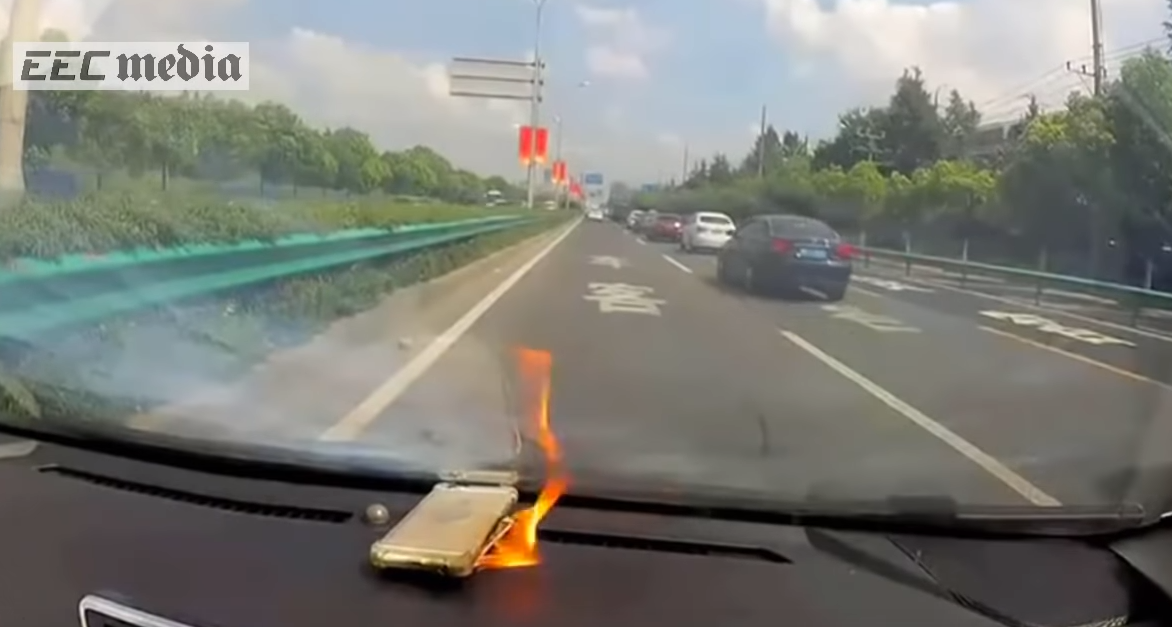
The latest fodder for these questions is the video above, in which a woman is driving with her husband, presumably having a perfectly fine day, when her iPhone spontaneously explodes on the car's dashboard. It seems to settle down for a minute and then reignites with an even larger flame, forcing her to stop the car.


This terrifying turn of events happened in Shanghai on August 1. The driver, whose name is Jiang, was reportedly driving with her husband and had her iPhone 6 battery replaced back in February from a repair store that wasn't certified. The iPhone's battery was not an official Apple replacement part and was found to be the cause of the explosion.


So the lesson here is that you should make sure you're taking your iPhone to an Apple-authorized repair store (but even official iPhone 6s have a history of exploding). So maybe the true lesson is to cast your phone into a river (or recycle it) and go live in the woods. 


Source: thrillist

Windows
Mac OS
iOS
Linux
3uTools
Win 64-bit For this device
V9.01 2025-12-27
Download
Win 32-bit For this device
V9.01 2025-12-27
Download
3uTools
Intel Chip How to Identify Chip Type
V9.01 2025-12-31
Download
Apple Silicon
V9.01 2025-12-31
Download
How to Identify Chip Type
1.  Click the Apple icon in the top-left corner of the screen and select About This Mac.
2.  Check the Processor or Chip field to determine if it is "Intel" or "Apple".
Please use the 3uTools PC client to install the iOS client:
1、 Install either the Windows or Mac version of 3uTools on your computer
2、 Open the PC client and connect your device to the computer via USB cable
3、 After the connection is successful, wait for the computer to automatically install the mobile app for the device, or locate “Install Mobile App” on the computer and manually click to install.
3uTools
deb file
V3.01 2025-11-20
Download
rpm file
V3.01 2025-11-20
Download
Windows
Windows
iOS
iOS
Android
Android
TV
TV
3uAirPlayer
Win 64-bit For this device
V6.0.2 2025-11-19
Download
Win 32-bit For this device
V6.0.2 2025-11-19
Download
iOS Device Mirroring (No App Required)
1、 Install 3uAirPlayer on the Windows PC
2、 Open Control Center and select Screen Mirroring
3、 From the list, choose your PC to start mirroring
4、 Or connect your iOS device to the PC via USB to begin mirroring
Scan to get "3uAirPlayer" App
3uAirPlayer TV V1.0.18
2025-11-28
TV System Requirements: Android 7.0 or later
Download the TV installation package, copy it to a USB drive, insert it into your TV or set-top box, then select the file from the home screen to install.