 NEWS
NEWS
Icon Found in iOS 12 Shows iPad with Thin Bezels and Face ID, no Home Button or Notch
 08/02/2018
 3028
3028
We’ve been expecting an update to the iPad Pro line for later this year. Rumors suggest that the new version will have no home button, Face ID and thinner bezels, following the design trend introduced by Apple with iPhone X.
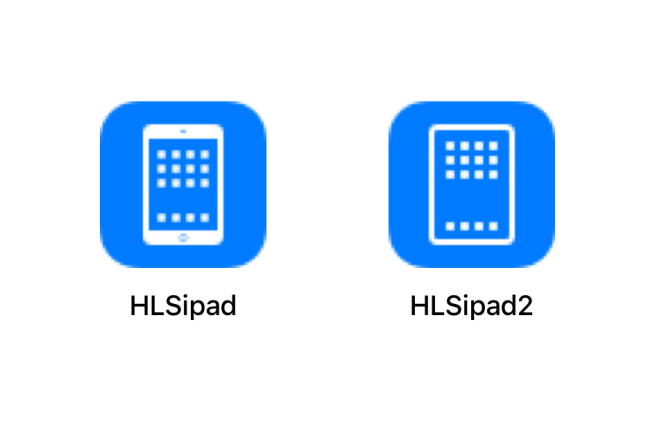
A new asset found in iOS 12 developer beta 5 seemingly confirms a new bezel-less iPad for the fall. The asset is part of the battery usage UI and it shows an iPad with no home button and thinner bezels. It wouldn’t be the first time a tiny glyph found in an OS reveals an unreleased product, last year the rumors about an iPhone with thin bezels were confirmed by the HomePod software leak.
One thing notably missing from the glyph is a notch. It seems to confirm that the 2018 iPad Pro model will be without a notch, unlike the 2018 iPhones, which are all rumored to have notches later this year. You can see a comparison between the regular iPad glyph and the new iPad glyph below. It’s clear that the new iPad has no home button and thin bezels.
The name of the asset specifies “iPad”, it’s new to iOS 12 beta 5 and there’s no references in the system yet, so it’s clear we’re talking about a future product, which will probably be the 2018 iPad Pro that is slated to be released this fall. We’ve seen other evidence in the OS that hints that Apple is preparing Face ID to support in landscape orientation, contrary to a rumor which claimed it would only work in portrait even on iPad.
Also, another finding confirms Face ID is coming to this year’s iPad Pro models.
This method in AccessibilitySettings confirms Face ID on the new iPad Pro (J3xx) pic.twitter.com/oeJQ0GxOoM
— Guilherme Rambo (@_inside) August 1, 2018
Source: 9to5mac










