 NEWS
NEWS
MacOS Sierra 10.12.2 Removes "Time Remaining" Battery Life Indicator
 12/14/2016
 4944
4944
MacOS Sierra 10.12.2, released this morning, features several key bug fixes and addresses an issue that has plagued some customers who purchased a new MacBook Pro with Touch Bar -- battery life.
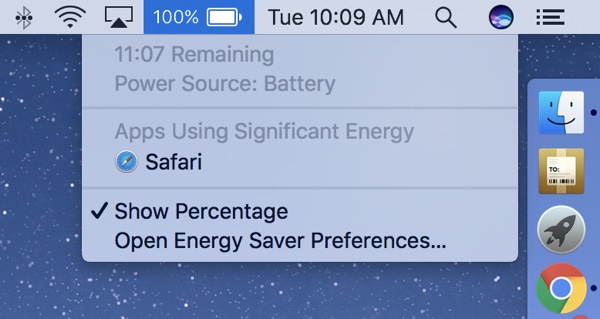
Apple believes that the battery life indicator in macOS Sierra is ultimately inaccurate and has led to some confusion about battery performance, and so it has been removed in macOS Sierra 10.12.2.
Going forward, the battery icon in the Mac's menu bar will offer a look at remaining battery percentage, but it won't provide estimates on how long the MacBook Pro's battery will last. Here's what Apple said about it to The Loop:
Apple said the percentage is accurate, but because of the dynamic ways we use the computer, the time remaining indicator couldn't accurately keep up with what users were doing. Everything we do on the MacBook affects battery life in different ways and not having an accurate indicator is confusing.
Besides the apps we are working on all the time, there are a lot of things that are happening in the background that users may not be aware of that affects battery life.
MacBook Pro buyers have complained about getting less than 10 hours of battery life, reporting as little as three hours of battery life in some cases, but battery performance can vary significantly based on the apps and processes that are running.
Customers with poor performance may be using apps that are not optimized for the new MacBook Pro, and on the 15-inch machine, if an app engages the discrete GPU, battery life takes a significant hit. For MacBook Pro owners who are seeing bad battery life, it's worth checking the Activity Monitor to make sure the dGPU is not in use.
Spotlight indexing, iCloud photo syncing, and other behind-the-scenes processes can also have an impact on battery life, especially when a machine is new.
According to The Loop, Apple has done extensive battery life testing on the MacBook Pro with Touch Bar and continues to stand by its battery life estimates of up to 10 hours. It seems Apple believes reports of bad battery life are largely based on the faulty indicator, but there have been some real world tests that don't rely on the estimate and still show poor performance.
Apple says its new MacBook Pros can get up to 10 hours of battery life when browsing the web or when watching iTunes movies.
Source: macrumors










