
NEWS

Apple’s total number of apps in the App Store declined for the first time last year

04/09/2018

2430

The App Store’s total number of apps available decreased in 2017 for the first time in the history of the marketplace, according to analytics company Appfigures. iOS apps in the App Store shrank to 2.1 million over the course of 2017, after beginning the year at 2.2 million.


The decline can be attributed in part to Apple’s decision back in 2016 to remove old apps that were no longer compatible with newer iPhones and apps that didn’t comply with recent review guidelines. Apps that were not built on 64-bit architecture were removed.

Apple’s total number of apps in the App Store declined for the first time last year


To add to the graveyard of dead mobile software, Apple also removed virus-scanning apps, apps that were clones of other apps, and other low quality apps that were cluttering up the App Store. Simultaneously, developers also submitted less new iOS apps in 2017 when compared to 2016, the data shows.


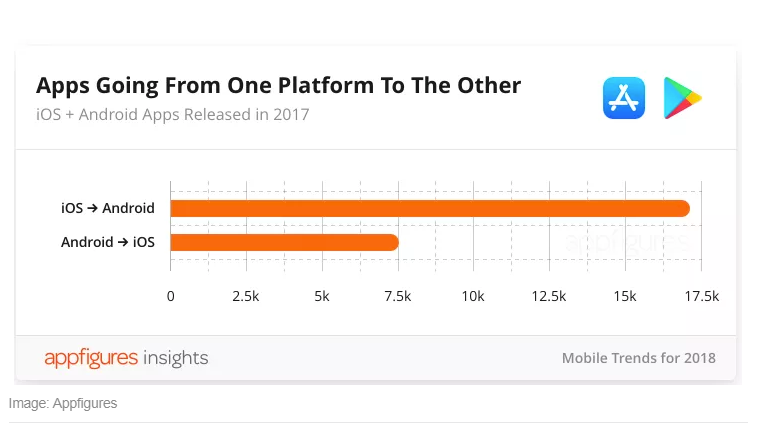
Google Play has, in contrast, outpaced Apple’s App Store since 2012, but 2017 marked the biggest gap between the two platforms. Google Play broke 1.5 million in new app releases while Apple teetered at 755,000 apps released in 2017. Appfigures stated that part of that was because many developers released Android versions of their iOS apps, but not vice versa as iOS still remains a preferred debut platform.


Source: theverge

Windows
Mac OS
iOS
Linux
3uTools
Win 64-bit For this device
V9.0 2025-11-11
Download
Win 32-bit For this device
V9.0 2025-11-11
Download
3uTools
Intel Chip How to Identify Chip Type
V9.0 2025-12-02
Download
Apple Silicon
V9.0 2025-12-02
Download
How to Identify Chip Type
1.  Click the Apple icon in the top-left corner of the screen and select About This Mac.
2.  Check the Processor or Chip field to determine if it is "Intel" or "Apple".
Please use the 3uTools PC client to install the iOS client:
1、 Install either the Windows or Mac version of 3uTools on your computer
2、 Open the PC client and connect your device to the computer via USB cable
3、 After the connection is successful, wait for the computer to automatically install the mobile app for the device, or locate “Install Mobile App” on the computer and manually click to install.
3uTools
deb file
V3.01 2025-11-20
Download
rpm file
V3.01 2025-11-20
Download
Windows
Windows
iOS
iOS
Android
Android
TV
TV
3uAirPlayer
Win 64-bit For this device
V6.0.2 2025-11-19
Download
Win 32-bit For this device
V6.0.2 2025-11-19
Download
iOS Device Mirroring (No App Required)
1、 Install 3uAirPlayer on the Windows PC
2、 Open Control Center and select Screen Mirroring
3、 From the list, choose your PC to start mirroring
4、 Or connect your iOS device to the PC via USB to begin mirroring
Scan to get "3uAirPlayer" App
3uAirPlayer TV V1.0.18
2025-11-28
TV System Requirements: Android 7.0 or later
Download the TV installation package, copy it to a USB drive, insert it into your TV or set-top box, then select the file from the home screen to install.




