 NEWS
NEWS
Saudi Prince Meets Tim Cook at Apple Park to Talk App Development, Education
 04/08/2018
 3730
3730
At the tail end of his whistle stop tour of the U.S., Saudi Crown Prince Mohammed bin Salman on Saturday met with Tim Cook and other top Apple executives at the company's Cupertino headquarters to discuss new partnerships and education opportunities.
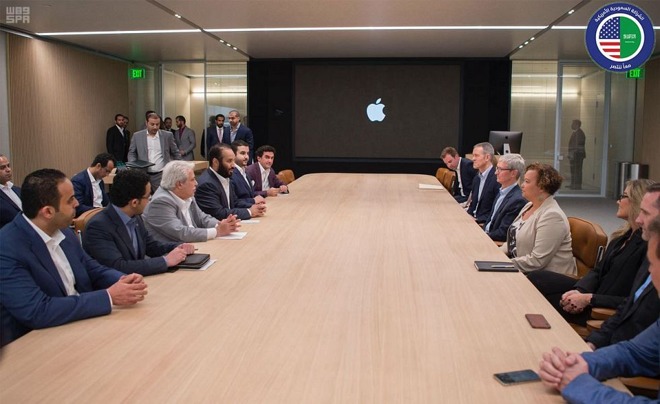
After blazing a cross-country trail over the past three weeks, Prince Mohammed and several Saudi officials landed in California to meet with heads of major tech companies. This week the Prince, widely known as "MBS," visited Virgin founder Richard Branson and Magic Leap founder Rony Abovitz before heading to Google's headquarters in Mountain View to chat with co-founder Sergey Brin and CEO Sundar Pichai. He spent some time with Apple's executives on Saturday.
The primary focus of the Apple meet and greet was to discuss technological solutions for "enriching the Arabic educational content in the classroom" and potentially creating an educational curriculum for Saudi schools.
This is not the first time Apple has been approached by heads of state, or in this case successor to the throne, to help modernize their respective educational systems. In 2013, then Turkish Prime Minister and current President Recep Tayyip Erdoğan visited Apple as it mulled an educational investment in iPad.
Education has been an important pillar of Apple's business for decades and the company recently showed off its latest advancements in the area at an education-focused event in Chicago last month. Apple debuted a number of new software tools designed to fit the needs of teachers and students in a 21st century classroom, including the Everyone Can Create curriculum that combines technology and creativity to help students navigate several different disciplines, from math to science to coding.
At the Saturday meeting, the Prince also discussed partnerships for creating apps in Saudi Arabia and potential job opportunities for Saudi youth looking to train at Apple's headquarters. Technical presentations covering education, health and marketing were also conducted.
The meeting, which was held at Apple Park, gave the visiting dignitaries the chance to tour Steve Jobs Theater, where Apple showed off "modern voice applications," presumably its Siri virtual assistant.
This was Prince Mohammed's first trip to the U.S. since becoming heir to the throne. Following the Apple stop, he plans to meet with executives in Los Angeles to discuss bringing commercial cinema to Saudi Arabia.
Source: appleinsider










