NEWS

Apple Submits New Emoji that Includes Guide Dogs, Prosthetic Limbs, and More

03/26/2018

2691

Apple Submits New Emoji that Includes Guide Dogs, Prosthetic Limbs, and More


Apple has just submitted another round of emoji to the Unicode Consortium, which means the company is aiming to include even more options for Apple device owners in the coming months.


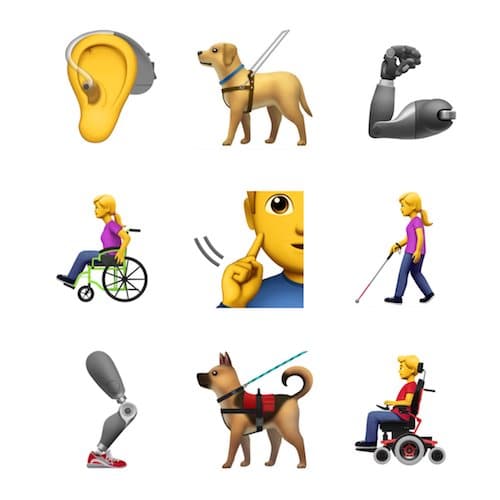
This time around, as first discovered by Emojipedia, Apple is leaning into accessibility emoji, and is including nine new options. That includes a hearing aide, prosthetic limbs, guide dogs, sign language, and more:


“New emojis proposed include a guide dog, hearing aid, prosthetic limbs, as well as people using canes and different types of wheelchairs.”


Apple’s goal here, according to Apple’s own opening remarks in its submission to the Unicode Consortium, is an effort to “better represent individuals with disabilities”. Apple also states that this is just an “initial starting point” in these efforts, which suggests the company is still hard at work including even more options in the future.


“Apple is requesting the addition of emoji to better represent individuals with disabilities. Currently, emoji provide a wide range of options, but may not represent the experiences of those with disabilities.”


There is no word on when these new emoji will be approved, or even if they will be at all. If they are, it will take some time before they are included in any official software updates from Apple.


Source: iphonehacks

Windows
Mac OS
iOS
Linux
3uTools
Win 64-bit For this device
V9.0 2025-11-11
Download
Win 32-bit For this device
V9.0 2025-11-11
Download
3uTools
Intel Chip How to Identify Chip Type
V9.0 2025-12-02
Download
Apple Silicon
V9.0 2025-12-02
Download
How to Identify Chip Type
1.  Click the Apple icon in the top-left corner of the screen and select About This Mac.
2.  Check the Processor or Chip field to determine if it is "Intel" or "Apple".
Please use the 3uTools PC client to install the iOS client:
1、 Install either the Windows or Mac version of 3uTools on your computer
2、 Open the PC client and connect your device to the computer via USB cable
3、 After the connection is successful, wait for the computer to automatically install the mobile app for the device, or locate “Install Mobile App” on the computer and manually click to install.
3uTools
deb file
V3.01 2025-11-20
Download
rpm file
V3.01 2025-11-20
Download
Windows
Windows
iOS
iOS
Android
Android
TV
TV
3uAirPlayer
Win 64-bit For this device
V6.0.2 2025-11-19
Download
Win 32-bit For this device
V6.0.2 2025-11-19
Download
iOS Device Mirroring (No App Required)
1、 Install 3uAirPlayer on the Windows PC
2、 Open Control Center and select Screen Mirroring
3、 From the list, choose your PC to start mirroring
4、 Or connect your iOS device to the PC via USB to begin mirroring
Scan to get "3uAirPlayer" App
3uAirPlayer TV V1.0.18
2025-11-28
TV System Requirements: Android 7.0 or later
Download the TV installation package, copy it to a USB drive, insert it into your TV or set-top box, then select the file from the home screen to install.