NEWS

Apple Shares Tips for Taking 'Pro' Photos Using iPhone 7 Plus Portrait Mode

12/07/2016

3782

Apple Shares Tips for Taking 'Pro' Photos Using iPhone 7 Plus Portrait Mode


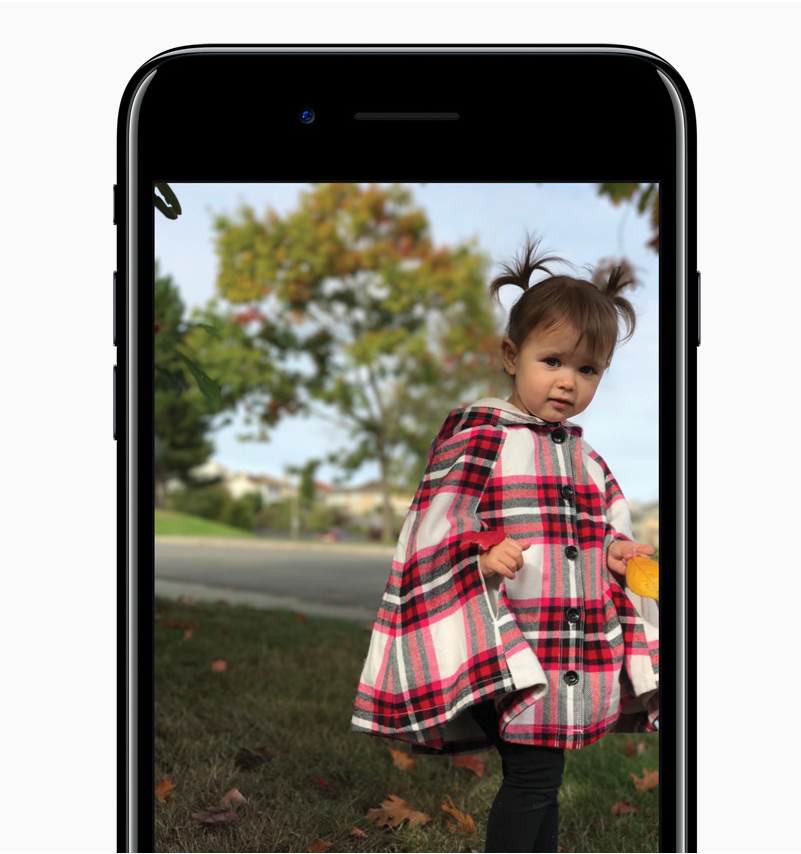
Apple today shared some tips to "Shoot like a Pro" with depth-of-field "Portrait" effect in the iPhone 7 Plus, highlighting a range of suggestions collected from professional photographers on its news site. 

Tips include getting up close to a subject to bring out details, minimizing the background, putting the sun behind a subject, slightly underexposing, and using soft, diffused lighting. 

The suggestions are sourced from fashion photographer JerSean Golatt, celebrity photographer Jeremy Cowart, travel photographer Pei Ketron, and wedding photographer Benj Haisch, and are accompanied by photos shot on the iPhone 7 Plus. 

For many years running, the iPhone has been the 
most popular camera on Flickr, which has encouraged Apple to make continual improvements to the camera equipment in its smartphones. 

Along with dual cameras and the Portrait mode in the iPhone 7 Plus, both the iPhone 7 and the iPhone 7 Plus feature lens, sensor, stabilization, and image signal processor improvements that offer much improved performance compared to previous-generation devices, especially in low-light conditions.


Source: Apple

Windows
Mac OS
iOS
Linux
3uTools
Win 64-bit For this device
V9.0 2025-11-11
Download
Win 32-bit For this device
V9.0 2025-11-11
Download
3uTools
Intel Chip How to Identify Chip Type
V9.0 2025-12-02
Download
Apple Chip
V9.0 2025-12-02
Download
How to Identify Chip Type
1.  Click the Apple icon in the top-left corner of the screen and select About This Mac.
2.  Check the Processor or Chip field to determine if it is "Intel" or "Apple".
Please use the 3uTools PC client to install the iOS client:
1、 Install either the Windows or Mac version of 3uTools on your computer
2、 Open the PC client and connect your device to the computer via USB cable
3、 After the connection is successful, wait for the computer to automatically install the mobile app for the device, or locate “Install Mobile App” on the computer and manually click to install.
3uTools
deb file
V3.01 2025-11-20
Download
rpm file
V3.01 2025-11-20
Download
Windows
Windows
iOS
iOS
Android
Android
TV
TV
3uAirPlayer
Win 64-bit For this device
V6.0.2 2025-11-19
Download
Win 32-bit For this device
V6.0.2 2025-11-19
Download
iOS Device Mirroring (No App Required)
1、 Install 3uAirPlayer on the Windows PC
2、 Open Control Center and select Screen Mirroring
3、 From the list, choose your PC to start mirroring
4、 Or connect your iOS device to the PC via USB to begin mirroring
Scan to get "3uAirPlayer" App
3uAirPlayer TV V1.0.18
2025-11-28
TV System Requirements: Android 7.0 or later
Download the TV installation package, copy it to a USB drive, insert it into your TV or set-top box, then select the file from the home screen to install.