 NEWS
NEWS
Apple Takes Aim at Amazon With E-Books Push
 01/26/2018
 2786
2786
Apple is working on a redesigned version of its iBooks e-book reading application for iPhones and iPads and has hired an executive from Amazon to help.
The new app, due to be released in coming months, will include a simpler interface that better highlights books currently being read and a redesigned digital book store that looks more like the new App Store launched last year, according to people familiar with its development. The revamped app in testing includes a new section called Reading Now and a dedicated tab for audio books, the people said.
Apple released an early version of its iOS 11.3 mobile operating system update to developers on Wednesday, providing a hint that the new e-books app is on the way. The app is now simply called "Books," rather than "iBooks," according to the update. That follows other Apple services, like iTunes and iTunes Podcasts, that changed into apps like Apple Music and Apple Podcasts.
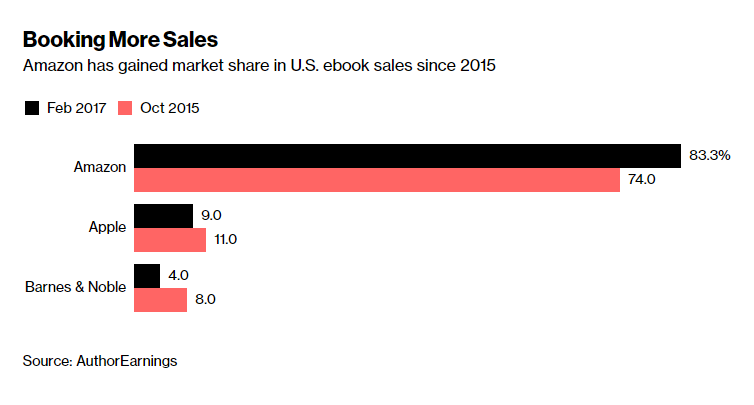
This will be the biggest upgrade to Apple’s e-book service in several years and provides renewed competition in a market that Amazon has dominated. Selling digital books was once a key part of Apple’s services business, and the company was a contender against Amazon. But the U.S. Department of Justice sued Apple and publishers in 2012, alleging they orchestrated a scheme to raise the price of e-books. That resulted in a $450 million fine for Apple in 2016. Many industry participants blasted the ruling, arguing it handed even more control of the market to Amazon.
The e-commerce giant had just over 83 percent of the U.S. e-book market in early 2017, up from 74 percent in October 2015, according to AuthorEarnings, which tracks book sales for writers and other industry participants.
After the legal blow, Apple’s digital-services work focused more on Apple Music, App Store sales, and movie rentals. But Chief Executive Officer Tim Cook has pledged that services will generate about $50 billion in annual revenue by 2021, up from $30 billion last year. So the pressure is on to pursue all available opportunities, including e-books and audio books.
Apple recently tapped a new executive to lead the revived Books effort. In December, it hired Kashif Zafar, a senior vice president from Audible, Amazon’s audio books business. Before that, Zafar was a content vice president at Barnes & Noble’s Nook e-reader division, according to his LinkedIn profile. An Apple spokesman declined to comment.
Apple’s renewed effort highlights its different approach to software services and hardware, compared with Amazon. Apple sells e-books to make its high-priced devices more attractive, making money on the sale of the hardware. Amazon churns out new versions of Kindle devices at or near to cost and tries to make money selling content.
Amazon has revamped its Kindle app for reading on Apple’s devices recently, while Google has started promoting audio books on its Google Play digital media store.
Source: bloomberg










