 NEWS
NEWS
Developer Adoption of Apple's ARKit Tepid After iOS 11 Launch
 01/04/2018
 3686
3686
Less than 1,000 apps on the App Store support Apple's augmented reality tools, and the number of apps adopting ARKit has slowed since September, a new survey has found.
The data was released on Wednesday by app market intelligence firm Apptopia, which found that the number of new apps with ARKit tools integrated fell sharply after debuting in September. The number hit a low in November before rebounding slightly in December, but still remains behind the adoption rate seen in October.
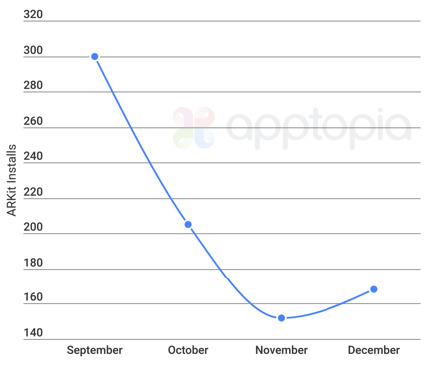
The data suggests that while some developers were keen to embrace ARKit at launch, interest in the new capabilities in iOS 11 has softened among app releases and updates.
In all, about 300 apps with ARKit were said to have debuted on the App Store in September, around the launch of iOS 11. The number fell to just over 200 in October, before approaching 150 in November. According to Apptopia, it rebounded to around 170 in December.
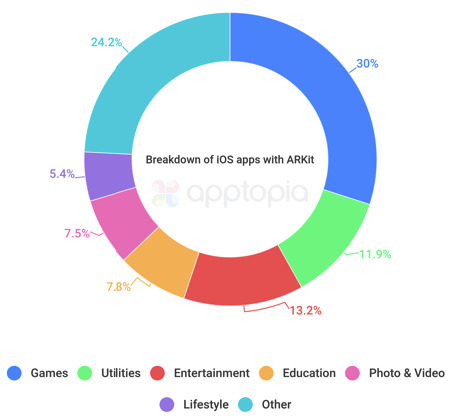
To date, in all, Apptopia says there are less than 1,000 apps with ARKit capabilities, of more than 3 million downloads available on the App Store.
Its data found that most —30 percent —of ARKit apps are games. The next most popular app category was entertainment at 13.2 percent, followed by utilities with 11.9 percent. A large number of apps fell under an undefined "other" category, accounting for 24.2 percent of options.
Remaining uses are education (7.8 percent), photo and video (7.5 percent), and lifestyle (5.4 percent).
With this fall's launch of ARKit, and comments from Apple Chief Executive Tim Cook extolling the potential of the technology, the company's bullish outlook on augmented reality is well known. Cook said in late October that the iPhone maker is focused on making the customer experience with augmented reality second to none, trusting that revenue and profits will follow as technology and apps improve.
"I view AR as profound," Cook said. "Not today, not the app you'll see on the App Store today, but what it will be, what it can be. I think it's profound, and I think Apple is in a really unique position to lead in this area."
Source: appleinsider










