NEWS

Apple Park Office Chairs Cost Nearly $1,200 Apiece, Handpicked by Designer Jony Ive

01/03/2018

2486

Apple Park Office Chairs Cost Nearly $1,200 Apiece, Handpicked by Designer Jony Ive


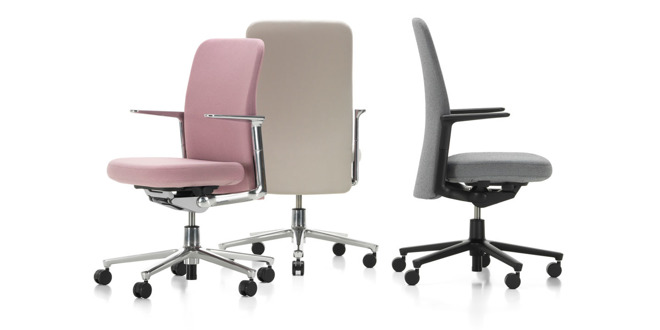
The designers of the chair, Barber and Ed Osgerby, met with Ive several years ago over drinks, Fast Company said on Tuesday. The pair explained to him that the Pacific was designed to be "quiet," with curves that let it blend into any environment. 

Ive reportedly raised an eyebrow, telling the Osgerbys "That's interesting." Although it took several more months, Apple became the first party to buy the Pacific —ordering enough chairs for every workstation at Apple Park, which can accommodate some 12,000 people.

Ive is known to prefer simple and elegant designs, such that they appear "inevitable" to the end user even if they actually took months or years of testing.

Close attention to detail —by Ive, Apple co-founder Steve Jobs, and others —is believed to be one reason why Apple Park took so long to complete. While Jobs presented the project to the Cupertino City Council in 2011, Apple didn't break ground until 2014, a year late and just one year before an intended 2015 opening. Apple employees finally began moving over in early 2017, and some parts of the campus are 
still under construction.

In total the project may cost Apple 
$5 billion or more, over the net worth of many fellow corporations.


Source: apple insider

Windows
Mac OS
iOS
Linux
3uTools
Win 64-bit For this device
V9.01 2025-12-27
Download
Win 32-bit For this device
V9.01 2025-12-27
Download
3uTools
Intel Chip How to Identify Chip Type
V9.01 2025-12-31
Download
Apple Silicon
V9.01 2025-12-31
Download
How to Identify Chip Type
1.  Click the Apple icon in the top-left corner of the screen and select About This Mac.
2.  Check the Processor or Chip field to determine if it is "Intel" or "Apple".
Please use the 3uTools PC client to install the iOS client:
1、 Install either the Windows or Mac version of 3uTools on your computer
2、 Open the PC client and connect your device to the computer via USB cable
3、 After the connection is successful, wait for the computer to automatically install the mobile app for the device, or locate “Install Mobile App” on the computer and manually click to install.
3uTools
deb file
V3.01 2025-11-20
Download
rpm file
V3.01 2025-11-20
Download
Windows
Windows
iOS
iOS
Android
Android
TV
TV
3uAirPlayer
Win 64-bit For this device
V6.0.2 2025-11-19
Download
Win 32-bit For this device
V6.0.2 2025-11-19
Download
iOS Device Mirroring (No App Required)
1、 Install 3uAirPlayer on the Windows PC
2、 Open Control Center and select Screen Mirroring
3、 From the list, choose your PC to start mirroring
4、 Or connect your iOS device to the PC via USB to begin mirroring
Scan to get "3uAirPlayer" App
3uAirPlayer TV V1.0.18
2025-11-28
TV System Requirements: Android 7.0 or later
Download the TV installation package, copy it to a USB drive, insert it into your TV or set-top box, then select the file from the home screen to install.