 NEWS
NEWS
Apple Pay Cash to Leverage Discover Network
 12/08/2017
 3524
3524
The Apple Pay Cash card, which was just introduced in December with the latest iOS 11 update, is part of newly introduced functionality that Apple has added to Apple Pay, its mobile wallet. US users now have the ability to send and receive via Apple Pay in the firm's messaging platform, iMessage. Funds are then added to a virtual Apple Pay Cash card that is issued by Green Dot, a prepaid card firm, to be used for online and in-store purchases.
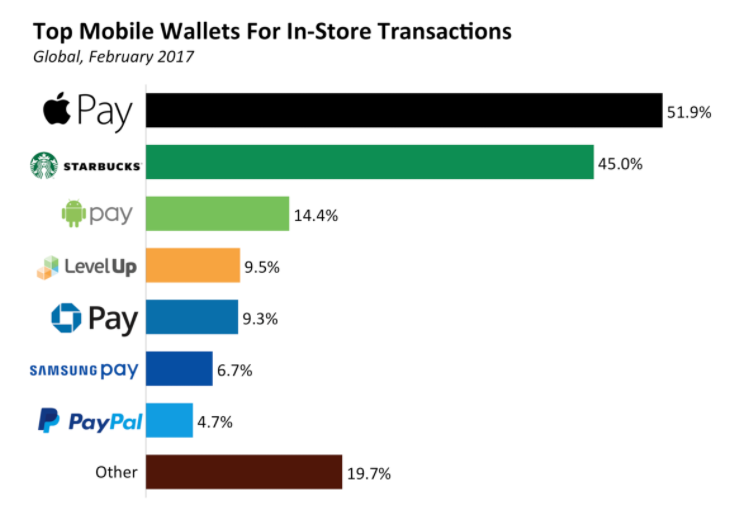
This partnership should help grow usage and adoption of Apple's payment offerings, which in turn will increase the number of transactions performed on Discover's network.
* Discover has a massive reach, which includes a large acceptance network, giving Apple Pay Cash users more chances to use their cards. Discover was accepted by 9.3 million merchants in the US as of 2014, just slightly trailing Visa and Mastercard, which were accepted by 9.5 million merchants, according to the Nilson Report. Discover is also the fourth-largest credit card brand in the US, with roughly 44 million customers as of mid-2016.
* Apple Pay's new P2P payments feature could lead to millions of dollars being added to accounts, which could drive transactions on Discover's network. US mobile P2P volume will reach $336 billion in 2021, worth 46% of total US P2P volume. That’s up from $19 billion and 3%, respectively, in 2015. By leveraging one of the most popular chat apps in the world, Apple Pay should see more users adopt the payment option — as of early 2016, over 17 billion messages were sent on the service daily. As more users send and receive funds, many will likely opt to keep funds in their Apple accounts rather than waiting for funds to clear into their bank accounts. This would likely lead to increased transactions via Apple's virtual debit card, which will be handled on the Discover Network.
Source: businessinsider










