
NEWS

People Are Petitioning for Apple to Take Down Games Glorifying Duterte's War on Drugs

10/13/2017

3129

Over a hundred organisations in the Philippines are calling on Apple to take down gaming apps associated with President Duterte's war on drugs.


The letter addressed to Apple CEO Tim Cook was signed by 131 organisations, including human rights groups, and drug rehabilitation centres. In it, they ask for the tech giant to "immediately remove apps that are promoting murder, extrajudicial killings, violence and the war on drugs in the Philippines."


The games, some of which are also available on the Google Play store, see Duterte doing everything from shooting guns at criminals to killing drug dealers.
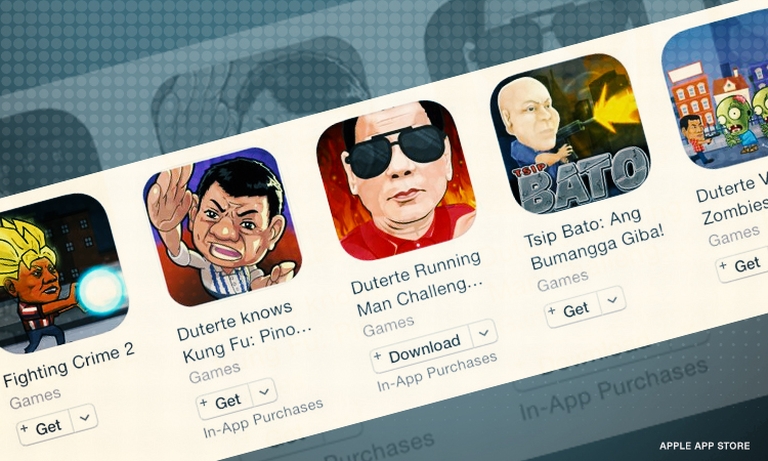

People Are Petitioning for Apple to Take Down Games Glorifying Duterte's War on Drugs


The organisations against the games say that they "valorise and normalise the emerging tyranny of Duterte's presidency and his government's disregard for human rights.


The issue of drug-related deaths is a sensitive one in the Philippines, a country which has recently seen thousands killed as a result of the president's anti-drug campaign.


President Duterte, who has been nicknamed The Punisher, had praised the crackdown, saying that if the country "could kill another 32 [drug users] every day, then maybe we can reduce what ails this country."


But Duterte on Thursday pulled the country's police force off the anti-drug campaign, instead handing it over to the country's drug enforcement agency, in light of growing criticism of the crackdown.


Source: mashable

Windows
Mac OS
iOS
Linux
3uTools
Win 64-bit For this device
V9.01 2025-12-27
Download
Win 32-bit For this device
V9.01 2025-12-27
Download
3uTools
Intel Chip How to Identify Chip Type
V9.0 2025-12-02
Download
Apple Silicon
V9.0 2025-12-02
Download
How to Identify Chip Type
1.  Click the Apple icon in the top-left corner of the screen and select About This Mac.
2.  Check the Processor or Chip field to determine if it is "Intel" or "Apple".
Please use the 3uTools PC client to install the iOS client:
1、 Install either the Windows or Mac version of 3uTools on your computer
2、 Open the PC client and connect your device to the computer via USB cable
3、 After the connection is successful, wait for the computer to automatically install the mobile app for the device, or locate “Install Mobile App” on the computer and manually click to install.
3uTools
deb file
V3.01 2025-11-20
Download
rpm file
V3.01 2025-11-20
Download
Windows
Windows
iOS
iOS
Android
Android
TV
TV
3uAirPlayer
Win 64-bit For this device
V6.0.2 2025-11-19
Download
Win 32-bit For this device
V6.0.2 2025-11-19
Download
iOS Device Mirroring (No App Required)
1、 Install 3uAirPlayer on the Windows PC
2、 Open Control Center and select Screen Mirroring
3、 From the list, choose your PC to start mirroring
4、 Or connect your iOS device to the PC via USB to begin mirroring
Scan to get "3uAirPlayer" App
3uAirPlayer TV V1.0.18
2025-11-28
TV System Requirements: Android 7.0 or later
Download the TV installation package, copy it to a USB drive, insert it into your TV or set-top box, then select the file from the home screen to install.




