 NEWS
NEWS
iPhone 7s Again Said to be Thicker to Accommodate Glass back + Wireless Charging
 08/30/2017
 3036
3036
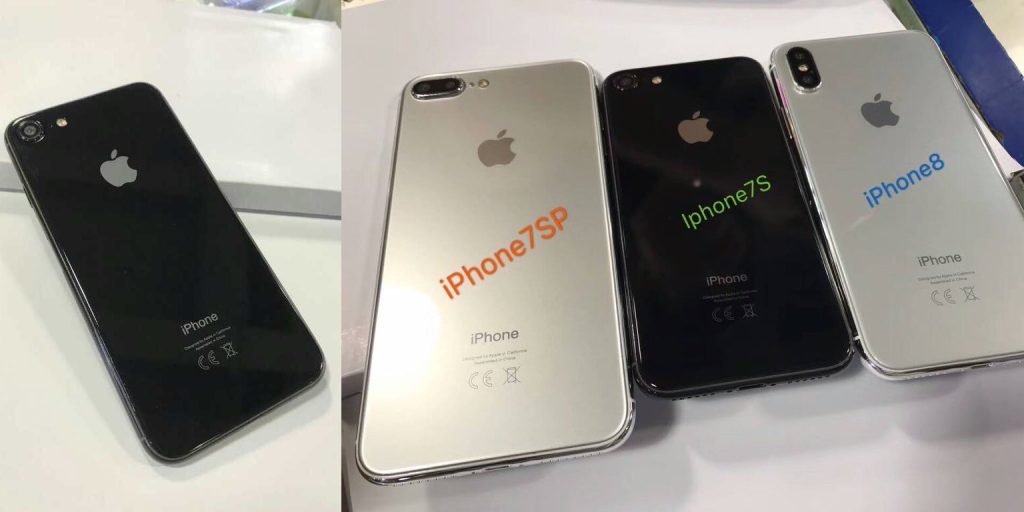
Earlier this month, a report claimed that the iPhone 7s would be thicker due to the switch to glass backing to accommodate wireless charging.TechnoBuffalo today corroborates that report, reiterating detailed information on the dimensions of the iPhone 7s and iPhone 7s…
Today’s report, citing a “trusted and reliable source,” says the iPhone 7s and iPhone 7s Plus will be “slightly bigger in every dimension. What this means, should today’s report reign true, is the two devices will be wider, taller, and thicker than the ones before them.
The iPhone 7s will reportedly come in at 138.44 mm x 67.26 mm x 7.21 mm, which is marginally larger that the iPhone 7 at 138.3 mm x 67.1 mm x 7.1 mm. Meanwhile, the iPhone 7s Plus is said to shape up at 158.37 mm x 78.1 mm x 7.41 mm, whereas the iPhone 7 Plus currently is 158.2 mm x 77.9 mm x 7.3 mm.
The report earlier this week attributed the iPhone 7s size increase to the switch to glass backing. Earlier reports had explained that Apple was adopting glass backs across all of its 2017 iPhone devices in order to accommodate its inductive wireless charging. The iPhone 7s has appeared in multiple glass backdummy unit leaks while the new models are expected to be limited to just three colors: black, silver, anda version of gold.
The marginal increase in size will likely go unnoticed by most users, but it’s interesting to see Apple putting the adoption of pseudo-wireless charging technology ahead of design. The iPhone 8 is likewise expected to thicker than its predecessors for wireless charging and the all-glass design.
Apple is expected to hold a media event on September 12th to announce its new line of smartphones, including the iPhone 7s, iPhone 7s Plus, and iPhone 8. A new Apple Watch model and a 4K Apple TV are expected to be unveiled at the same event.
Source: 9to5mac










