
NEWS

Apple Changed the Maps Icon to Show Its New Spaceship Campus

08/15/2017

2625

Apple has been making all sorts of tiny changes to its app icons in the iOS 11 beta. And today, it made two of the most interesting changes yet: one to Maps, and one to the App Store.


The Maps change is a bit more fun. The icon has, since the iPhone’s inception, shown 1 Infinite Loop — the location of Apple’s longtime headquarters. But with the company’s enormous spaceship campus, known as the Apple Park, now opening up, iOS designers seem to have felt it was time to make a change. So instead, the Maps icon now shows a sliver of the spaceship.
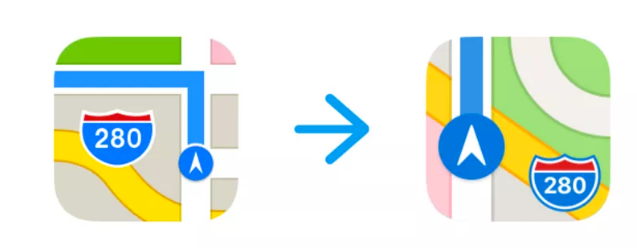

Apple Changed the Maps Icon to Show Its New Spaceship Campus


Today’s other icon change is to the App Store logo. Apple has tweaked the App Store’s icon here and there over the past decade, but this is the first time it’s lost the pen and brush that make up its shape. It’s now just a series of lines that kind of look like overlapping sticks. I don’t think anyone’s going to argue that the old icon was amazing and shouldn’t be changed, but this new one looks like some weird knockoff app that somehow got installed on your phone.


Apple’s been tweaking other icons a bit, too. It slightly adjusted the clock icon today, making the numbers a bit thicker.


Source: theverge

Windows
Mac OS
iOS
Linux
3uTools
Win 64-bit For this device
V9.0 2025-11-11
Download
Win 32-bit For this device
V9.0 2025-11-11
Download
3uTools
Intel Chip How to Identify Chip Type
V9.0 2025-12-02
Download
Apple Silicon
V9.0 2025-12-02
Download
How to Identify Chip Type
1.  Click the Apple icon in the top-left corner of the screen and select About This Mac.
2.  Check the Processor or Chip field to determine if it is "Intel" or "Apple".
Please use the 3uTools PC client to install the iOS client:
1、 Install either the Windows or Mac version of 3uTools on your computer
2、 Open the PC client and connect your device to the computer via USB cable
3、 After the connection is successful, wait for the computer to automatically install the mobile app for the device, or locate “Install Mobile App” on the computer and manually click to install.
3uTools
deb file
V3.01 2025-11-20
Download
rpm file
V3.01 2025-11-20
Download
Windows
Windows
iOS
iOS
Android
Android
TV
TV
3uAirPlayer
Win 64-bit For this device
V6.0.2 2025-11-19
Download
Win 32-bit For this device
V6.0.2 2025-11-19
Download
iOS Device Mirroring (No App Required)
1、 Install 3uAirPlayer on the Windows PC
2、 Open Control Center and select Screen Mirroring
3、 From the list, choose your PC to start mirroring
4、 Or connect your iOS device to the PC via USB to begin mirroring
Scan to get "3uAirPlayer" App
3uAirPlayer TV V1.0.18
2025-11-28
TV System Requirements: Android 7.0 or later
Download the TV installation package, copy it to a USB drive, insert it into your TV or set-top box, then select the file from the home screen to install.




