NEWS

Construction Workers are Posting Snapchat Stories from Inside Apple Park

08/10/2017

2832

Construction Workers are Posting Snapchat Stories from Inside Apple Park


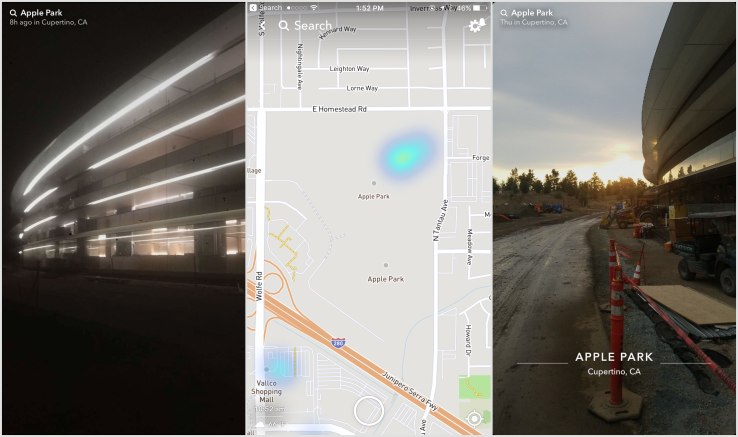
Snapchat’s powerful but hidden Story Search feature is finally making itself useful by giving us a behind-the-scenes glimpse inside Apple Park, Apple’s new spaceship-like campus that will open soon.


Typing “Apple Park” into Snapchat’s search bar will show you the Apple Park Story, which is a collection of videos taken on the property. The full Apple Park story isn’t showing up on the map itself, so you’re better off searching for it directly instead of scrolling around the map.


Construction Workers are Posting Snapchat Stories from Inside Apple Park


All the videos are likely coming from construction workers, since the office isn’t yet open to employees.


The pictures show how close the campus is to being finished – the main atrium with real trees seems complete, and most of the work still being done, at least in these videos, seems happening outside the building itself.


Since Snapchat stories expire after 24 hours you can only see posts posted from today and yesterday, but it also signals that there may be more content coming daily, unless of course Apple steps in and asks Snap to removes the videos and photos.


Check out some of the pictures above, and if you want to check it out on Snapchat just type in Apple Park into the search bar. You can also check out some of the video footage below


Source: techcrunch

Windows
Mac OS
iOS
Linux
3uTools
Win 64-bit For this device
V9.0 2025-11-11
Download
Win 32-bit For this device
V9.0 2025-11-11
Download
3uTools
Intel Chip How to Identify Chip Type
V9.0 2025-12-02
Download
Apple Silicon
V9.0 2025-12-02
Download
How to Identify Chip Type
1.  Click the Apple icon in the top-left corner of the screen and select About This Mac.
2.  Check the Processor or Chip field to determine if it is "Intel" or "Apple".
Please use the 3uTools PC client to install the iOS client:
1、 Install either the Windows or Mac version of 3uTools on your computer
2、 Open the PC client and connect your device to the computer via USB cable
3、 After the connection is successful, wait for the computer to automatically install the mobile app for the device, or locate “Install Mobile App” on the computer and manually click to install.
3uTools
deb file
V3.01 2025-11-20
Download
rpm file
V3.01 2025-11-20
Download
Windows
Windows
iOS
iOS
Android
Android
TV
TV
3uAirPlayer
Win 64-bit For this device
V6.0.2 2025-11-19
Download
Win 32-bit For this device
V6.0.2 2025-11-19
Download
iOS Device Mirroring (No App Required)
1、 Install 3uAirPlayer on the Windows PC
2、 Open Control Center and select Screen Mirroring
3、 From the list, choose your PC to start mirroring
4、 Or connect your iOS device to the PC via USB to begin mirroring
Scan to get "3uAirPlayer" App
3uAirPlayer TV V1.0.18
2025-11-28
TV System Requirements: Android 7.0 or later
Download the TV installation package, copy it to a USB drive, insert it into your TV or set-top box, then select the file from the home screen to install.