 NEWS
NEWS
Apple's tvOS Simulator Hacked to Run at 4K Resolution
 08/09/2017
 3199
3199
Images published on Tuesday show Apple's tvOS Simulator hacked to run at 4K resolution, suggesting that Apple likely has little interface work to do to support a fifth-generation Apple TV believed to be coming this fall.
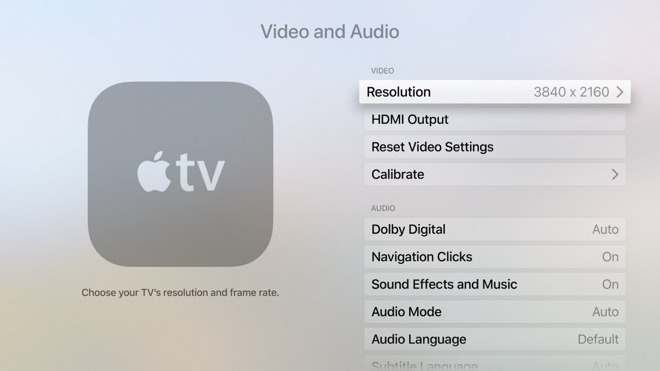
"Pro tip: if you're making art for tvOS, I'd be adding @2x elements already just to be prepared," said developer Steve Troughton-Smith, the source of the images. The current Apple TV runs at 1080p resolution, and pixel-doubling that results in 4K content —specifically 3,840 by 2,160 pixels.
For tvOS app developers, it should be an "easy transition, same as original Retina iPhone," Troughton-Smith said. The developer noted that "even upscaled images look fine, and especially on a TV screen."
Code uncovered in Apple's HomePod firmware recently revealed plans for a 4K Apple TV, which should also support high dynamic range (HDR) in 10-bit, Dolby Vision and HLG formats. It's not certain when the device will ship, but previous rumors have hinted towards the fall.
The Apple TV has lagged behind other media players in terms of picture output. Amazon's Fire TV, Google's Chromecast Ultra, and Roku's Premiere and Ultra models all support 4K and usually HDR, even though some of the options cost as little as $69 —well under the Apple TV's $149 minimum.
The A8 processor in the fourth-generation Apple TV isn't powerful enough to make a 4K software update for it "worthwhile," Troughton-Smith suggested. Apple will presumably bump a fifth-gen set-top up to the A9 used in the iPhone 6s —the first iPhone to support 4K recording, though not playback —or the A10 used in the iPhone 7. The "A11" from this year's "iPhone 8" is unlikely, since using older hardware helps keep the Apple TV's price down.
Source: appleinsider










