
NEWS

PSG Fan Goes to Unbelievable Lengths in Apple Store to Troll Barca Over Neymar Transfer

08/09/2017

2659

Paris Saint-Germain fans are, generally, pretty bloody pleased that their club have managed to sign Brazilian superstar Neymar from Barcelona.


The football world is still in shock that the French side have actually signed the winger, who was bought out of his Barca contract for a staggering £198m.


He will undoubtedly become the star of the team and pin-up of the division, and PSG's gain is absolutely Barca's loss - which is definitely the feeling of one fan in particular, who decided to use an Apple store of all places to troll last year's La Liga runners-up.
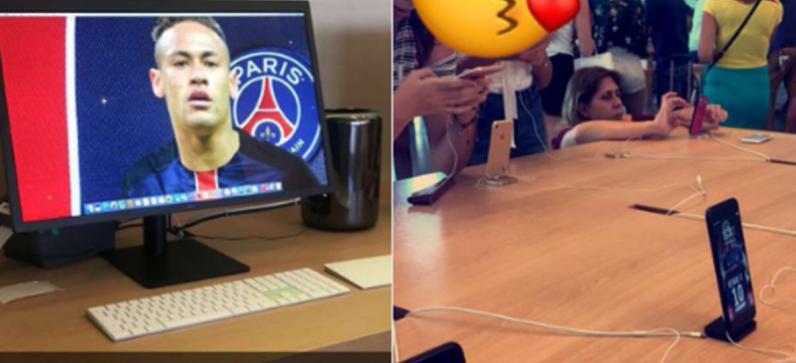

PSG Fan Goes to Unbelievable Lengths in Apple Store to Troll Barca Over Neymar Transfer


The French fan was in the city of Barcelona and cheekily decided to change every single Mac, iPad and iPhone background to a picture of Neymar in his new PSG attire. The absolute audacity!


Blaugrana fans are not happy about losing the superstar, and surely won't take to kindly to this rubbing of salt in the wounds.


They will hopefully have a new star to idolise before long though - the club have been linked with the likes of Philippe Coutinho, Kylian Mbappe, Paulo Dybala and Ousmane Dembele, with the former looking the most likely at this point.


Source: si

Windows
Mac OS
iOS
Linux
3uTools
Win 64-bit For this device
V9.0 2025-11-11
Download
Win 32-bit For this device
V9.0 2025-11-11
Download
3uTools
Intel Chip How to Identify Chip Type
V9.0 2025-12-02
Download
Apple Silicon
V9.0 2025-12-02
Download
How to Identify Chip Type
1.  Click the Apple icon in the top-left corner of the screen and select About This Mac.
2.  Check the Processor or Chip field to determine if it is "Intel" or "Apple".
Please use the 3uTools PC client to install the iOS client:
1、 Install either the Windows or Mac version of 3uTools on your computer
2、 Open the PC client and connect your device to the computer via USB cable
3、 After the connection is successful, wait for the computer to automatically install the mobile app for the device, or locate “Install Mobile App” on the computer and manually click to install.
3uTools
deb file
V3.01 2025-11-20
Download
rpm file
V3.01 2025-11-20
Download
Windows
Windows
iOS
iOS
Android
Android
TV
TV
3uAirPlayer
Win 64-bit For this device
V6.0.2 2025-11-19
Download
Win 32-bit For this device
V6.0.2 2025-11-19
Download
iOS Device Mirroring (No App Required)
1、 Install 3uAirPlayer on the Windows PC
2、 Open Control Center and select Screen Mirroring
3、 From the list, choose your PC to start mirroring
4、 Or connect your iOS device to the PC via USB to begin mirroring
Scan to get "3uAirPlayer" App
3uAirPlayer TV V1.0.18
2025-11-28
TV System Requirements: Android 7.0 or later
Download the TV installation package, copy it to a USB drive, insert it into your TV or set-top box, then select the file from the home screen to install.




