
NEWS

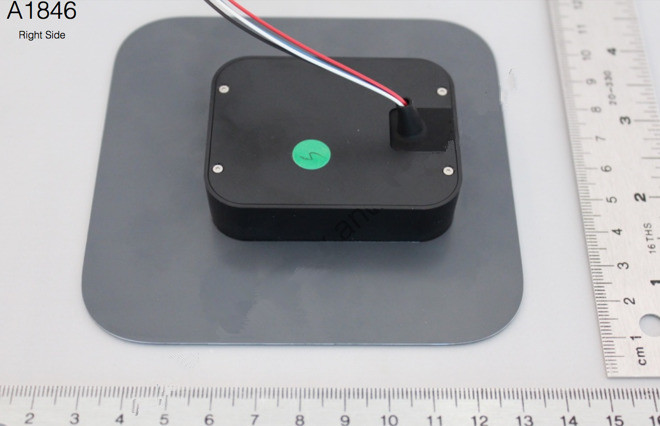
Apple's Custom Badge Reader for Apple Park Pop Up in FCC Filing

08/07/2017

3712

According to the user manual included with the filing, it's for granting access to restricted areas to people with a company-provided credential. 


"The reader will indicate granted access by briefly changing color to green and playing a sound. Declined access is indicated by red color and a second sound," according to the filing. 


The filing was the second in a series of three mysterious Apple FCC authorization filings describing devices with Apple-style model numbers that popped up over the past year. 180 days after authorization was granted, and showed a door assembly with a NFC-capable badge reader.

Apple's Custom Badge Reader for Apple Park Pop Up in FCC Filing


This badge reader, codenamed A1846, has wireless NFC capability as well. 


There are off-the-shelf badge readers available on the market, but Apple Park, Apple's $5 billion campus opening this year, has a lot of custom details spearheaded by Apple's design head Jony Ive, including custom-built door handles, tables, and even banisters. Apple didn't immediately respond to a request for more information. 


We don't know much else about this badge reader, but we're sure the sound it makes when it unlocks is amazing.


Source: businessinsider

Windows
Mac OS
iOS
Linux
3uTools
Win 64-bit For this device
V9.0 2025-11-11
Download
Win 32-bit For this device
V9.0 2025-11-11
Download
3uTools
Intel Chip How to Identify Chip Type
V9.0 2025-12-02
Download
Apple Silicon
V9.0 2025-12-02
Download
How to Identify Chip Type
1.  Click the Apple icon in the top-left corner of the screen and select About This Mac.
2.  Check the Processor or Chip field to determine if it is "Intel" or "Apple".
Please use the 3uTools PC client to install the iOS client:
1、 Install either the Windows or Mac version of 3uTools on your computer
2、 Open the PC client and connect your device to the computer via USB cable
3、 After the connection is successful, wait for the computer to automatically install the mobile app for the device, or locate “Install Mobile App” on the computer and manually click to install.
3uTools
deb file
V3.01 2025-11-20
Download
rpm file
V3.01 2025-11-20
Download
Windows
Windows
iOS
iOS
Android
Android
TV
TV
3uAirPlayer
Win 64-bit For this device
V6.0.2 2025-11-19
Download
Win 32-bit For this device
V6.0.2 2025-11-19
Download
iOS Device Mirroring (No App Required)
1、 Install 3uAirPlayer on the Windows PC
2、 Open Control Center and select Screen Mirroring
3、 From the list, choose your PC to start mirroring
4、 Or connect your iOS device to the PC via USB to begin mirroring
Scan to get "3uAirPlayer" App
3uAirPlayer TV V1.0.18
2025-11-28
TV System Requirements: Android 7.0 or later
Download the TV installation package, copy it to a USB drive, insert it into your TV or set-top box, then select the file from the home screen to install.




