
NEWS

Latest Gboard on iOS Gets Integrated YouTube and Maps Search

08/01/2017

2599

More than a year since the launch of the Google Gboard and the Microsoft Word Flow keyboard for iOS, only the former is now available on the App Store and has received a big update today, while the other was killed off in favour of SwiftKey.


With the latest update, Gboard now features integrated YouTube and Google Maps search, which will give these Google services more limelight on iOS. The search feature is arguably the keyboard's best feature and the addition of these two services will be welcomed by users mainly due to the convenience of getting results without leaving the app they're using.
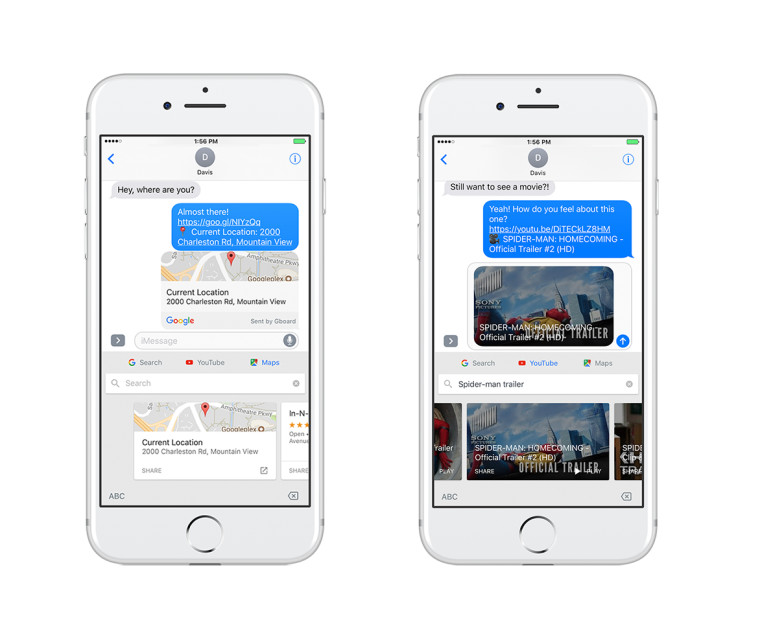

Latest Gboard on iOS Gets Integrated YouTube and Maps Search

In addition to the new search integration, Gboard on iOS now comes with a new Ink feature that allows the users to draw and share images directly from the keyboard. To use Ink, the user needs to switch to emoji mode and click on the pen icon.


The Gboard update is already rolling out to users worldwide. For those who haven't used it before, you can give the app a try by heading to the App Store.


Source: neowin

Windows
Mac OS
iOS
Linux
3uTools
Win 64-bit For this device
V9.0 2025-11-11
Download
Win 32-bit For this device
V9.0 2025-11-11
Download
3uTools
Intel Chip How to Identify Chip Type
V9.0 2025-12-02
Download
Apple Silicon
V9.0 2025-12-02
Download
How to Identify Chip Type
1.  Click the Apple icon in the top-left corner of the screen and select About This Mac.
2.  Check the Processor or Chip field to determine if it is "Intel" or "Apple".
Please use the 3uTools PC client to install the iOS client:
1、 Install either the Windows or Mac version of 3uTools on your computer
2、 Open the PC client and connect your device to the computer via USB cable
3、 After the connection is successful, wait for the computer to automatically install the mobile app for the device, or locate “Install Mobile App” on the computer and manually click to install.
3uTools
deb file
V3.01 2025-11-20
Download
rpm file
V3.01 2025-11-20
Download
Windows
Windows
iOS
iOS
Android
Android
TV
TV
3uAirPlayer
Win 64-bit For this device
V6.0.2 2025-11-19
Download
Win 32-bit For this device
V6.0.2 2025-11-19
Download
iOS Device Mirroring (No App Required)
1、 Install 3uAirPlayer on the Windows PC
2、 Open Control Center and select Screen Mirroring
3、 From the list, choose your PC to start mirroring
4、 Or connect your iOS device to the PC via USB to begin mirroring
Scan to get "3uAirPlayer" App
3uAirPlayer TV V1.0.18
2025-11-28
TV System Requirements: Android 7.0 or later
Download the TV installation package, copy it to a USB drive, insert it into your TV or set-top box, then select the file from the home screen to install.




