
NEWS

Chester Bennington Filmed Carpool Karaoke Episode For Apple Music Just Days Before His Death

07/25/2017

2707

Linkin Park singer Chester Bennington was filmed in an episode of Apple's upcoming show Carpool Karaoke: The Series just days before his death. 

Chester Bennington Filmed Carpool Karaoke Episode For Apple Music Just Days Before His Death


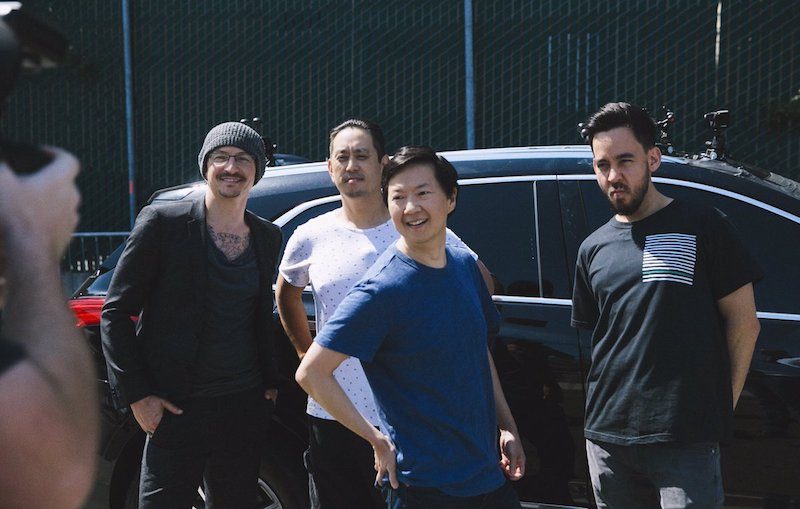
Earlier this month, the band tweeted an on-set photo with Bennington pictured alongside Linkin Park band members Joe Hahn and Mike Shinoda, and Ken Jeong, best known for his role as Ben Chang on the NBC sitcom Community. 


Carpool Karaoke: The Series, based on the popular segment from The Late Late Show with James Corden, is set to debut August 8 on Apple Music. Apple did not immediately respond when asked if Linkin Park's episode will still be released. 


Bennington committed suicide last Thursday, resulting in an outpouring of grief from his family, friends, and fans around the world. Linkin Park has set up a website in his memory and tweeted a message about him earlier today. 


"Our hearts are broken," the band said. "You touched so many lives, maybe even more than you realized. In the past few days, we've seen an outpouring of love and support, both public and private, from around the world." 


"I am in shock and heartbroken," tweeted Jeong. "All my thoughts and prayers go out to Chester and his family and friends at this time."


Source: macrumors

Windows
Mac OS
iOS
Linux
3uTools
Win 64-bit For this device
V9.0 2025-11-11
Download
Win 32-bit For this device
V9.0 2025-11-11
Download
3uTools
Intel Chip How to Identify Chip Type
V9.0 2025-12-02
Download
Apple Silicon
V9.0 2025-12-02
Download
How to Identify Chip Type
1.  Click the Apple icon in the top-left corner of the screen and select About This Mac.
2.  Check the Processor or Chip field to determine if it is "Intel" or "Apple".
Please use the 3uTools PC client to install the iOS client:
1、 Install either the Windows or Mac version of 3uTools on your computer
2、 Open the PC client and connect your device to the computer via USB cable
3、 After the connection is successful, wait for the computer to automatically install the mobile app for the device, or locate “Install Mobile App” on the computer and manually click to install.
3uTools
deb file
V3.01 2025-11-20
Download
rpm file
V3.01 2025-11-20
Download
Windows
Windows
iOS
iOS
Android
Android
TV
TV
3uAirPlayer
Win 64-bit For this device
V6.0.2 2025-11-19
Download
Win 32-bit For this device
V6.0.2 2025-11-19
Download
iOS Device Mirroring (No App Required)
1、 Install 3uAirPlayer on the Windows PC
2、 Open Control Center and select Screen Mirroring
3、 From the list, choose your PC to start mirroring
4、 Or connect your iOS device to the PC via USB to begin mirroring
Scan to get "3uAirPlayer" App
3uAirPlayer TV V1.0.18
2025-11-28
TV System Requirements: Android 7.0 or later
Download the TV installation package, copy it to a USB drive, insert it into your TV or set-top box, then select the file from the home screen to install.




