 NEWS
NEWS
Apple Wins Patent for Camera Field of View Effects for Superior Selfie Shots
 07/19/2017
 3340
3340
The U.S. Patent and Trademark Office officially published a series of 54 newly granted patents for Apple Inc. today. In this particular report we cover Apple's invention relating to the field of image capture, and more particularly, to acquiring images with a wide "field of view" (FOV) image sensor as they relate to taking superior 'Selfie' photos. The invention reveals that the sensor is smart enough to actually coax the user to hold the camera in a more optimal position.
Apple's patent FIG. 2A presented below illustrates an exemplary self-portrait image taken in portrait orientation at bent-arm's length; FIG. 2B illustrates an exemplary self-portrait image taken in portrait orientation at fully-extended arm's length.
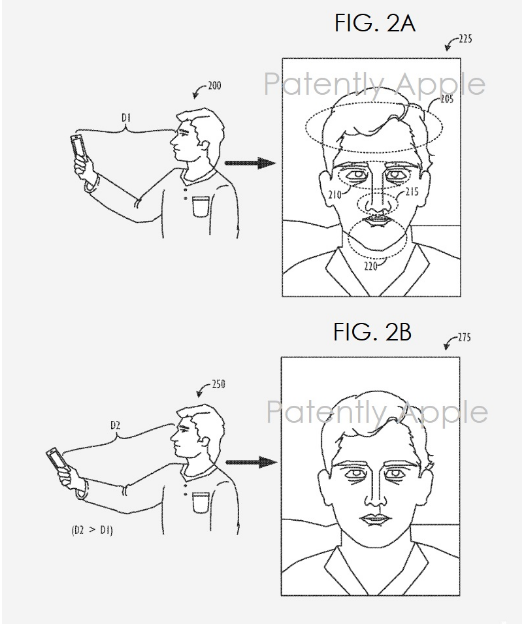
Apple notes that Traditionally, image sensors use a fixed field of view (FOV), whether the camera device is being held in "portrait" orientation or in "landscape" orientation. For camera devices with a relatively limited Field of View, e.g., a horizontal FOV of 57.degree. or less, this may result in sub-optimal "selfie" photo-taking conditions. For example, when attempting to compose a "group" selfie while holding the camera device in a "landscape" orientation, the FOV may not be sufficiently wide to capture all the members of the group, even when the camera device is being held by the user at a fully-extended arm's length (estimated at around 50 cm). Conversely, when attempting to compose a traditional, "self-only" selfie while holding the camera device in a "portrait" orientation, typically at a bent-arm's length (estimated at around 30 cm), the camera may be so close to the user's face that the resulting captured image has unwanted perspective distortions, such as exaggerated nose, cheek, and/or forehead sizes, as well as the gaze of the user appearing "cross-eyed." For a standard consumer electronic device camera with a wide angle lens (e.g., a "rear-facing" camera), taking a portrait image requires moving within roughly 30 cm of the subject's face, which could be uncomfortable for the subject and result in a distorted image. A standard camera with a normal lens (i.e., non-wide angle lens) may not have a wide enough field of view to capture typical scenes.
Apple's patent FIG. 4 noted above is a flowchart illustrating a method of capturing enhanced self-portrait images using a wide diagonal FOV camera. Apple interestingly adds to FIG. 4 that the "image capture device may apply one or more FOV effects, e.g., optically zooming, cropping, scaling, or shifting, the image captured by the image sensor in order to coax the user to hold the image capture device in a more optimal portrait-taking position (Step 425)." Whether Apple dropped this feature or is one yet to come is unknown at this time.
Source: patentlyapple










