 NEWS
NEWS
'Baby Driver' Cut In Real Time With Avid On Apple's 15-inch MacBook Pro
 07/14/2017
 3843
3843
Hit film Baby Driver was cut essentially in real time on set on a MacBook Pro, cutting way back on the need for expensive post-primary photography re-shoots.
In an account published by The Beat film editor Paul Machliss called heist film Baby Driver the "most difficult edit" and "the hardest job" that he'd ever worked on. Machliss set up a 15-inch Retina MacBook Pro from before the 2016 relaunch to do the job actively on the set, to help assist with the tight choreography needed to sync the action with the heavily music-oriented action-filled script.
Using Avid, Machliss had the storyboards running on a lower video layer to help coordinate the action with the expected soundtrack. And, he did it all on the road, and outdoors.
"Roadside editing, you know, this is anywhere, anytime basically," Machliss told The Beat. "This was for a climactic chase sequence, and you could literally wheelit out of the main truck and be ready for Edgar in minutes."
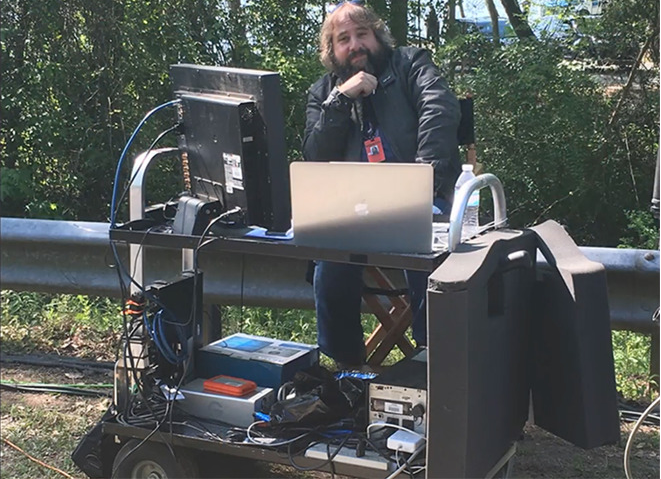
At one point, Machliss was in the rear of a process trailer, collecting footage as it was shot, to guarantee that re-shoots would be less of a problem after principal footage concluded.
Baby Driver tells the tale of the eponymous getaway driver, who cancels out tinnitus by constantly listening to music. The film is nearly always set to music that Baby is playing, with musical cues setting off action set pieces.
Machliss is primarily known for his editng work on Scott Pilgrim vs. the World, The World's End, and early seasons of the UK version of The IT Crowd.
Source: appleinsider










