 NEWS
NEWS
You Can Now Try HomeKit at Dozens of Apple Stores Around the World
 07/13/2017
 3245
3245
Apple has recently unveiled interactive HomeKit experiences in 46 of its retail stores worldwide, allowing customers to test out its smart home platform free of charge, according to TechCrunch. 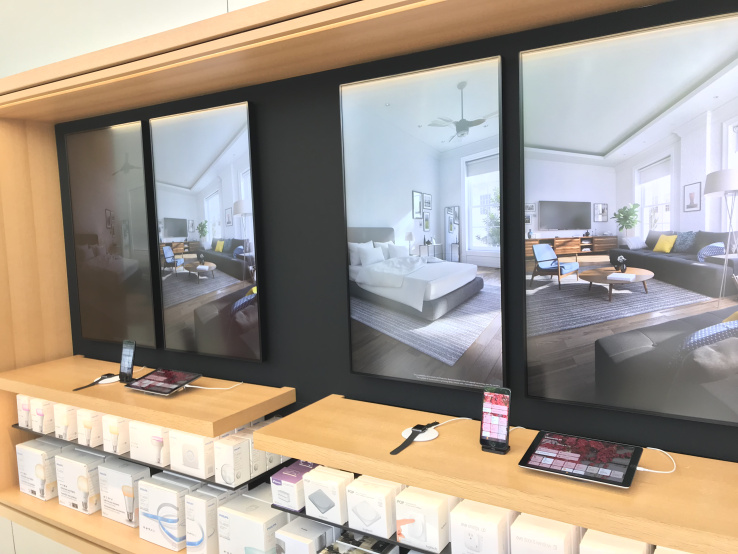
Each interactive setup consists of two vertical displays positioned behind an iPhone, iPad, and Apple Watch with the Home app, which customers can use to control accessories in the virtual room, such as lights and ceiling fans.
Now, when you go into Apple’s new retail stores, you’ll be able to use the Home app from either an Apple Watch, iPhone or iPad to control devices like the Phillips Hue light bulb, the Hunter ceiling fan and many others. If you tap to the lower the shades in the living room, for example, you’ll see the shades lower in the house shown on the screen.
In the United States, customers can try HomeKit at Apple's flagship Union Square store in San Francisco, its World Trade Center and Williamsburg stores in New York City, and 28 other stores not named throughout the country.
The experience is also available until at least December in 15 stores outside of the United States, including select locations in the United Kingdom, Germany, Mexico, Singapore, Taiwan, and the United Arab Emirates.
At every other Apple retail store, the company will be offering non-interactive HomeKit experiences, according to the report.
HomeKit enables Apple users to control lights, switches, thermostats, fans, and other products with its Home app and Siri voice commands. HomeKit-enabled accessories can be controlled singularly, or in scenes, which enable multiple accessories to work in combination, all with a single command.
Source: macrumors










