 NEWS
NEWS
Some Researchers Think Apple’s Bug Bounty Program Isn’t Competitive
 07/07/2017
 2908
2908
In 2016 at the popular Black Hat conference, where hackers from around the world gather for discussions, hacking competitions, and networking, Apple’s head of security Ivan Krstic announced an iOS bounty program. The program meant that hackers could comb iOS for security vulnerabilities and report them to Apple for a reward.
Some criticized Apple for being late to the game, as Microsoft and Google had bug bounty programs for years. Now Apple is being criticized because iOS and the structure of its bounty program are disincentivizing hackers from reporting bugs.
Some security researchers that Motherboard talked to said Apple’s rewards aren’t high enough. Apple has different categories of bug, and the highest amount Apple is offering is US$200,000. That’s a drop in the bucket compared to other companies like Zerodium and Exodus Intelligence. In the past these firms have offered rewards as high as US$1.5 million and US$500,000, respectively.
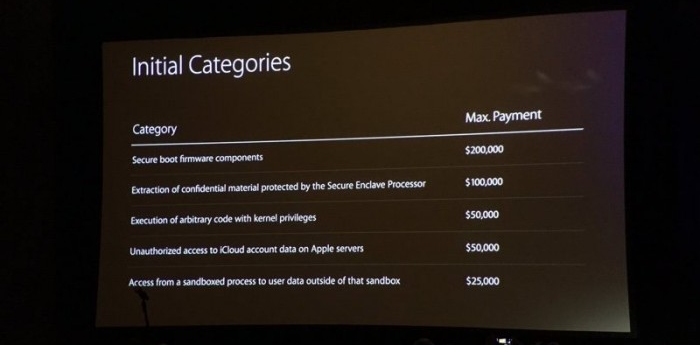
But Apple may not have considered that security researchers need bugs to find bugs. iOS is a highly secure, locked down operating system and it’s difficult for hackers to inspect, let alone break into.
That brings us to another issue: the iOS bounty program is invite-only. That means only a limited set of eyes are searching iOS code for vulnerabilities. If some hackers are keeping bugs they find, Apple might be shooting itself in the foot with its own program.
Apple might find it necessary to open up to more people, or pay higher rewards, to keep the attention of security researchers.
Source: macobserver










