 NEWS
NEWS
Your iPhone 7 May Have Been Manufactured By A Coal Worker
 07/05/2017
 3599
3599
At the massive factories that build iPhones for Apple in China, there are slow production seasons, and there are busy seasons.
In the fall, ahead of a big iPhone launch and the holiday sales boom, factories run by companies like Foxconn in China dramatically raise production to meet massive worldwide demand for new iPhones.
To make more iPhones, companies like Foxconn need more workers, and sometimes they get them from weird places, such as borrowing workers from state-owned coal companies in China.
Recruitment of these workers, who get paid a few dollars per day to assemble iPhones, is a big deal. Megaphones blare outside factory gates, villages are plastered with help-wanted signs, and local Chinese governments even issue quotas to villages or provinces to provide enough workers to ensure a successful iPhone harvest.
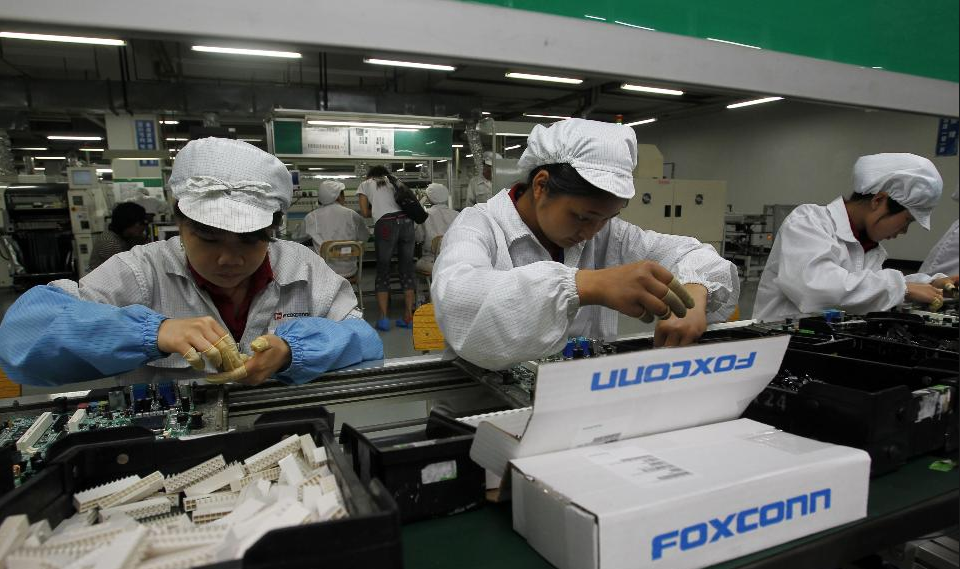
"During last fall’s rush to make the iPhone 7, when Foxconn was short-handed, state-owned coal companies lent workers to Foxconn. In past years, according to government notices online, the province issued quotas to local authorities stating how many workers they needed to produce for Foxconn."
A lot of this recruitment now serves to staff a factory in Zhengzhou, a city in east-central China that is sometimes called "iPhone City." The factory complex employs 250,000 workers, according to Foxconn. Workers often join up several times, quitting when they find better jobs or want to go back to their village.
Making an iPhone is still a hands-on process in China, with many workers at stations where they screw an individual screw over and over again. Foxconn has said it plans to automate its factories with robots.
During the fourth quarter of 2016, Apple sold 78.2 million iPhones, which generated $54 billion in revenue. Nearly all of those phones were assembled in China. President Donald Trump has said he'd like Apple to build a "big plant" in the United States.
Source: businessinsider










