NEWS

2017 App Store Revenue Crushes Apple’s Entire 2007 Earnings

06/28/2017

3542

2017 App Store Revenue Crushes Apple’s Entire 2007 Earnings


Apple is making more revenue off the App Store alone in 2017 than it did in all of 2007, according to a new study that analyzed Apple’s money-printing app empire.


When the iPhone launched in 2007, Steve Jobs absolutely refused to let third-party apps on his beloved device. Fast forward ten years later and not it’s not just hard to imagine the iPhone without the App Store. It’s hard to imagine Apple being as profitable without it.


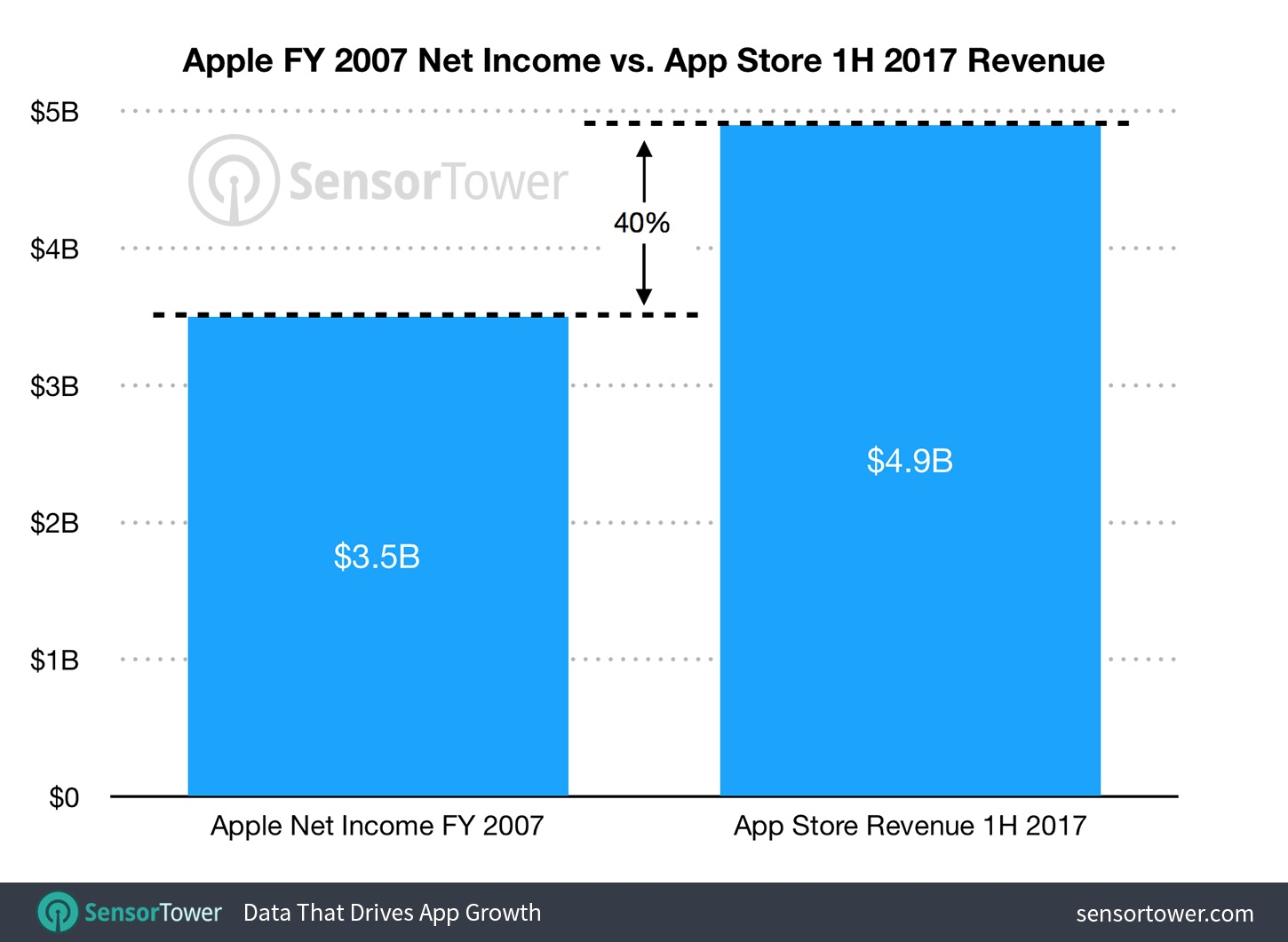
Revenue from App Store purchases in the first six months of 2017 was nearly 40% the total amount of revenue Apple brought in for the entire fiscal year of 2007 when the iPhone launched.


Based on data from the folks at SensorTower, App Store revenues during the first half of 2017 totaled about $4.8 billion. That’s 1.4 billion more than the $3.5 billion Apple brought in for 2007.

2017 App Store Revenue Crushes Apple’s Entire 2007 Earnings


App Store revenue continues to be a growingly important revenue stream for Apple. From 2013 to 2016, App Store revenue grew from 1% to 3.4% of Apple’s total revenue. The App Store contributed $7.28 billion to Apple’s bottom lime in 2016, and it’s expected to be slightly higher in 2017 as Apple’s user base grows.


Source: cult of mac

Windows
Mac OS
iOS
Linux
3uTools
Win 64-bit For this device
V9.0 2025-11-11
Download
Win 32-bit For this device
V9.0 2025-11-11
Download
3uTools
Intel Chip How to Identify Chip Type
V9.0 2025-12-02
Download
Apple Silicon
V9.0 2025-12-02
Download
How to Identify Chip Type
1.  Click the Apple icon in the top-left corner of the screen and select About This Mac.
2.  Check the Processor or Chip field to determine if it is "Intel" or "Apple".
Please use the 3uTools PC client to install the iOS client:
1、 Install either the Windows or Mac version of 3uTools on your computer
2、 Open the PC client and connect your device to the computer via USB cable
3、 After the connection is successful, wait for the computer to automatically install the mobile app for the device, or locate “Install Mobile App” on the computer and manually click to install.
3uTools
deb file
V3.01 2025-11-20
Download
rpm file
V3.01 2025-11-20
Download
Windows
Windows
iOS
iOS
Android
Android
TV
TV
3uAirPlayer
Win 64-bit For this device
V6.0.2 2025-11-19
Download
Win 32-bit For this device
V6.0.2 2025-11-19
Download
iOS Device Mirroring (No App Required)
1、 Install 3uAirPlayer on the Windows PC
2、 Open Control Center and select Screen Mirroring
3、 From the list, choose your PC to start mirroring
4、 Or connect your iOS device to the PC via USB to begin mirroring
Scan to get "3uAirPlayer" App
3uAirPlayer TV V1.0.18
2025-11-28
TV System Requirements: Android 7.0 or later
Download the TV installation package, copy it to a USB drive, insert it into your TV or set-top box, then select the file from the home screen to install.