 NEWS
NEWS
Apple-1 Still Tops The List of Most-Wanted Tech Collectibles
 05/17/2017
 3070
3070
The allure of possessing No. 1 never grows old, whether it’s attaining the top ranking in college basketball or owning the first issue of Action Comics. Ask just about any collector of late-20th-century electronics and they’ll tell you the ultimate prize is a rare Apple-1, perhaps the most iconic of all devices to emerge during the personal computer revolution.
Introduced in 1976 by Steven P. Jobs and Stephen G. Wozniak, the Apple-1 was the first product produced by Apple Computer Inc., now Apple Inc. When Jobs and Wozniak pitched their kit-form computer to Paul Terrell, owner of The Byte Shop, the pioneer computer retailer quickly saw its potential.
“What I needed was an assembled and tested unit that could sell to people that really wanted to use them and not just to the technical audience,” Terrell recalled in a 2015 interview.
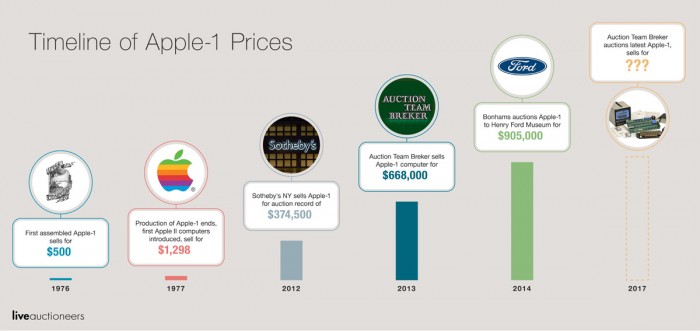
Convinced, he bought the first assembled Apple-1 units for $500 each and the ready-to-use personal computer was born. Today – 41 years later – the Apple-1 has never been in greater demand.
Accompanying Apple-1 (No. 01-0073) is an archive of historical documents, including its purchase receipt from November 1976, the earliest provisional manual, correspondence with Apple Inc., and even notes from 1977 telephone conversations with Wozniak. The outfit is expected to sell for $190,000-$320,000.
As the few remaining undiscovered Apple-1 computers become available, it’s anyone’s guess as to which way prices will go. Auction Team Breker has estimated the Apple-1 in their May 20 auction will sell for $190,000-$300,000, but that may be a conservative assessment.
Source: militarytechnologies










