
NEWS

Bling iPhone 7 in Dubai Available For Dhs14,000

03/22/2017

2674

Time Out has information and pictures of bling iphone 7 in Dubai available for Dhs14,000. Find out more about Finnish company Legend. Would you pay Dhs14,000 for a mobile phone? 


Well for those who like their iphone with added sparkle, soon you can, after a Finnish company opened up pre-order and shipping lines to Dubai for their diamond and gold encrusted smart devices. 

So what exactly do you get from Legend for your big bucks? To start, the basis of the Momentum model is a 24 carat gold plating. Then there are the diamonds, loads of them, illuminated, of course, and it's all topped with a 0.6 carat ruby surrounded by sea snail shell and black mother of pearl.
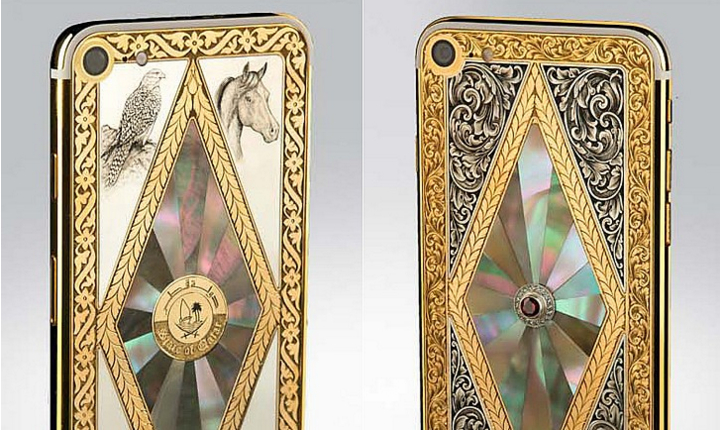
Bling iPhone 7 in Dubai Available For Dhs14,000


If you're a little light of the funds, you could opt for the Dhs12,000 model, known as Classique, but you'll be kissing goodbye to the ruby finish. 


Speaking to 7Days about their zaney designs, the Helsinki-based company said the current batch are merely the tip of the iceberg.

"There's no limit to the product that can be designed," a spokesman said, adding that real python or crocodile skin can also be incorporated. "The stones are fully customisable either emeralds or sapphires, or anything the client wants we can arrange."

Each custom design takes more than 50 working hours to create (that's above your average working week!), and comes with all relevant certification for the jewels.


Source: timeoutdubai


Windows
Mac OS
iOS
Linux
3uTools
Win 64-bit For this device
V9.0 2025-11-11
Download
Win 32-bit For this device
V9.0 2025-11-11
Download
3uTools
Intel Chip How to Identify Chip Type
V9.0 2025-12-02
Download
Apple Silicon
V9.0 2025-12-02
Download
How to Identify Chip Type
1.  Click the Apple icon in the top-left corner of the screen and select About This Mac.
2.  Check the Processor or Chip field to determine if it is "Intel" or "Apple".
Please use the 3uTools PC client to install the iOS client:
1、 Install either the Windows or Mac version of 3uTools on your computer
2、 Open the PC client and connect your device to the computer via USB cable
3、 After the connection is successful, wait for the computer to automatically install the mobile app for the device, or locate “Install Mobile App” on the computer and manually click to install.
3uTools
deb file
V3.01 2025-11-20
Download
rpm file
V3.01 2025-11-20
Download
Windows
Windows
iOS
iOS
Android
Android
TV
TV
3uAirPlayer
Win 64-bit For this device
V6.0.2 2025-11-19
Download
Win 32-bit For this device
V6.0.2 2025-11-19
Download
iOS Device Mirroring (No App Required)
1、 Install 3uAirPlayer on the Windows PC
2、 Open Control Center and select Screen Mirroring
3、 From the list, choose your PC to start mirroring
4、 Or connect your iOS device to the PC via USB to begin mirroring
Scan to get "3uAirPlayer" App
3uAirPlayer TV V1.0.18
2025-11-28
TV System Requirements: Android 7.0 or later
Download the TV installation package, copy it to a USB drive, insert it into your TV or set-top box, then select the file from the home screen to install.




