 NEWS
NEWS
Apple Park HQ Buttressed By Central & Wolfe 'AC3' Campus In Sunnyvale, Calif.
 03/15/2017
 4306
4306
Alongside the soon-to-open Apple Park, the iPhone maker's lesser-known "AC3" Central & Wolfe campus is also nearing completion, boasting many of the same environmental efforts that the main campus will provide.
Apple originally signed a lease with Landbank Investments LLC to occupy the firm's Central & Wolfe campus in late 2015, with the terms unknown, but said to be for 10 years. The site was purchased shortly thereafter by developer Jay Paul.
A website set up to showcase approved building designs reveals a trio of organically shaped, multi-story structures that connect around a central courtyard to create what looks like three-quarters of Apple's "command" key. Parking is primarily underground, with a central court capable of hosting food trucks, and some visitor parking.
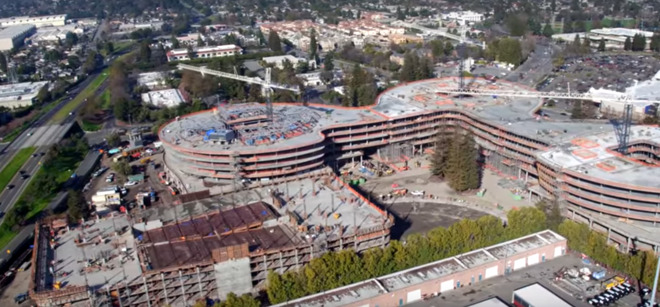
The footage of the site, provided by Level 10 Construction, shows small parks, walking paths, and wide open spaces populated by local flora. The original plans were to landscape the roof, but it does not appear that to be currently planned based on a rendering of the completed building.
Curved windows in the Central and Wolfe site are reminiscent of those used in Apple Park's main structure.
It is not known when Apple plans to move in. The Central & Wolfe project is located across the street from the Sunnyvale Crossing seven-building development Apple is already leasing, and is 3 miles away from Apple Park.
On Feb. 22, Apple officially named the "spaceship" campus under construction. The entire facility is now called "Apple Park," with the 20-foot tall and 165 foot in diameter glass auditorium honoring one of the founders of the company and named the "Steve Jobs Theater."
An environmentally-friendly design was paramount to Jobs's vision, and Apple's related Phase 2 project adds additional workspace adjacent to the main headquarters, and includes a small data center powered by on-site the on-site solar farm, fuel cells, and other sources of renewable energy.
Source: appleinsider










