
NEWS

App Store Featuring Indie Games as Part of New Promotion

03/10/2017

2947

Apple today updated its App Store with a major "Celebrating Indie Games" promotion that highlights a huge range of games created by independent developers and small app development companies. 

Mushroom 11, a newly released puzzle platformer, is the main feature in the App Store right now, with Monument ValleyDevice 6Super HexagonTransistor, and Superbrothers: Sword & Sorcery also receiving top billing at the current time. 
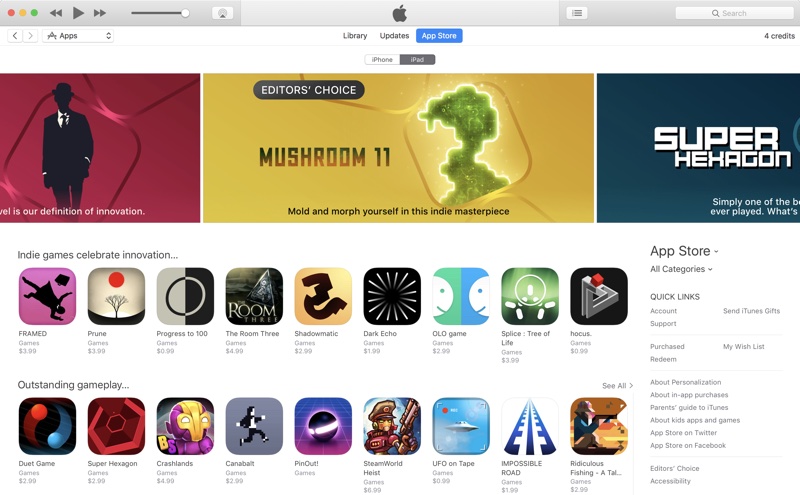

App Store Featuring Indie Games as Part of New Promotion


There are also a number of categories that have been updated with a selection of indie games, inclduing "Indie games celebrate innovation," "Outstanding gameplay," "Unforgettable stories" and "Incredible sound design." 

According to our sister site 
TouchArcade, Apple's indie games promotion may be the reason some high profile indie titles are coming out over the course of the next few days, including Bit CityTypeshift, and Card Thief

Most of the highlighted apps aren't on sale during this promotion, but it gives iOS gamers a way to find quality games that they may have missed.


Source: Macrumors

Windows
Mac OS
iOS
Linux
3uTools
Win 64-bit For this device
V9.0 2025-11-11
Download
Win 32-bit For this device
V9.0 2025-11-11
Download
3uTools
Intel Chip How to Identify Chip Type
V9.0 2025-12-02
Download
Apple Silicon
V9.0 2025-12-02
Download
How to Identify Chip Type
1.  Click the Apple icon in the top-left corner of the screen and select About This Mac.
2.  Check the Processor or Chip field to determine if it is "Intel" or "Apple".
Please use the 3uTools PC client to install the iOS client:
1、 Install either the Windows or Mac version of 3uTools on your computer
2、 Open the PC client and connect your device to the computer via USB cable
3、 After the connection is successful, wait for the computer to automatically install the mobile app for the device, or locate “Install Mobile App” on the computer and manually click to install.
3uTools
deb file
V3.01 2025-11-20
Download
rpm file
V3.01 2025-11-20
Download
Windows
Windows
iOS
iOS
Android
Android
TV
TV
3uAirPlayer
Win 64-bit For this device
V6.0.2 2025-11-19
Download
Win 32-bit For this device
V6.0.2 2025-11-19
Download
iOS Device Mirroring (No App Required)
1、 Install 3uAirPlayer on the Windows PC
2、 Open Control Center and select Screen Mirroring
3、 From the list, choose your PC to start mirroring
4、 Or connect your iOS device to the PC via USB to begin mirroring
Scan to get "3uAirPlayer" App
3uAirPlayer TV V1.0.18
2025-11-28
TV System Requirements: Android 7.0 or later
Download the TV installation package, copy it to a USB drive, insert it into your TV or set-top box, then select the file from the home screen to install.




