NEWS
iPhone Duo Surpasses 260,000 Folds in Ongoing Durability Test
 11/06/2026
 303
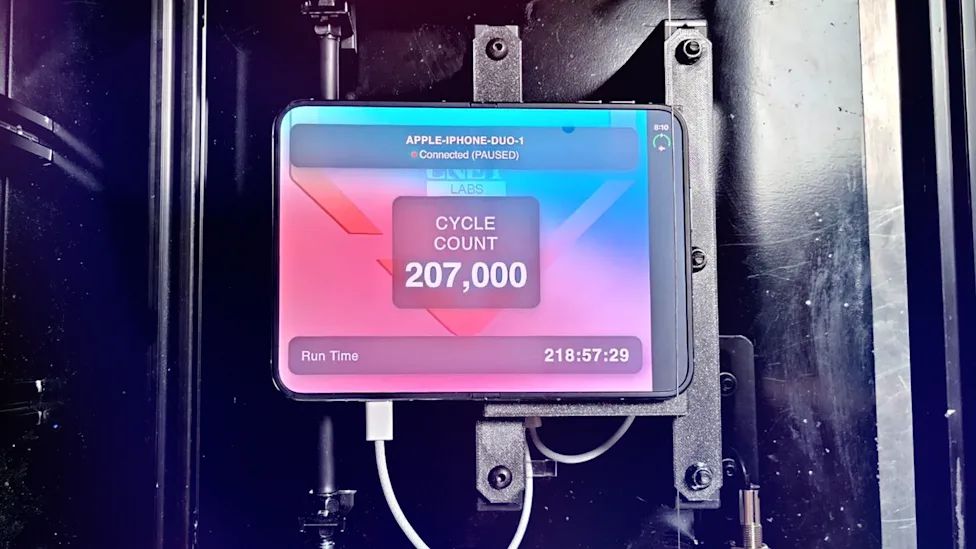
Credit: CNET
Apple's first foldable iPhone is facing another major durability test, and the results so far are encouraging. CNET's custom-built folding machine has put the iPhone Duo through more than 260,000 opening and closing cycles, with no major signs of hinge or display deterioration reported so far.
CNET's Fold-a-Phone Tests the iPhone Duo Around the Clock
CNET developed a custom machine called Fold-a-Phone to test how well the iPhone Duo handles repeated folding. The device has been running continuously, opening and closing the phone 24 hours a day, seven days a week, with only occasional breaks.
The test is also being livestreamed on YouTube every weekday from 1 p.m. to 5 p.m. ET, allowing viewers to follow the phone's progress in real time.
When the latest livestream ended on November 4, the iPhone Duo had completed more than 260,000 folds after over a week of testing.
Hinge and Display Crease Still Holding Up
So far, the results have been positive. According to CNET, both the hinge mechanism and the display crease appear to be holding up well despite the extensive folding.
The test is particularly interesting because the inner display and hinge are among the most important durability concerns for any foldable smartphone. Repeated opening and closing can potentially affect hinge resistance and make the crease more noticeable over time.
However, the current results do not necessarily mean the device is immune to long-term wear. CNET plans to continue the experiment until at least November 20 to see how the iPhone Duo performs after even more folding cycles.
The ongoing test offers another useful look at the durability of Apple's first foldable iPhone. Whether the hinge and display can maintain their condition over hundreds of thousands of folds remains to be seen.