 NEWS
NEWS
iOS 27.2 Beta Reveals Redesigned Health App With Apple Intelligence
 09/17/2026
 21
21
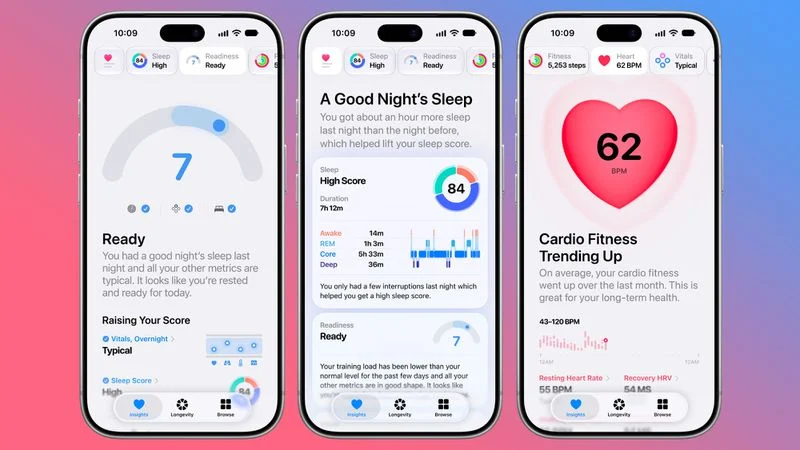
Apple has introduced a redesigned Health app in the first beta of iOS 27.2, giving developers an early look at the company's next-generation health and wellness features.
The new Health app is designed to use Apple Intelligence to analyze data collected from the iPhone and Apple Watch and provide more personalized health guidance.
However, Apple says the redesigned Health app is still being tested and will not be included in the initial public release of iOS 27.2. Instead, Apple plans to roll out the new experience later this year.
Apple Intelligence-Powered Health Insights
The redesigned Health app introduces a new Insights tab that uses Apple Intelligence to summarize recent health data.
For example, users could see updates about their latest sleep metrics, a new peak in VO2 max, or other notable changes in their health data.
The For You section can also provide personalized information related to areas such as readiness, fitness, and heart health.
Personal Guidance Adapts to Your Data
Personal Guidance is another major addition to the Insights experience.
The feature is designed to understand what matters to each user and provide recommendations based on their health and activity data.
For example, someone focusing on cardiovascular fitness could receive a suggestion to add interval training to a morning run.
Rather than providing identical recommendations to everyone, Apple's system is designed to adapt its suggestions based on individual data and goals.
New Readiness Score
Apple is also introducing a new Readiness feature with the latest Apple Watch models.
Readiness takes recent activity, vital signs, and sleep data into account to generate a score from 0 to 10.
The result is accompanied by recommendations about how much activity may be appropriate for the day, with categories such as:
●Recover
●Pace Yourself
●Ready
●Go For It
Readiness information can be viewed on the Apple Watch, in the Fitness app, and through the Insights tab in the Health app.
Fitness and Vitals Get New Views
The Health app will also provide more detailed fitness information throughout the day.
The Fitness section incorporates daily activity data and updates as new information becomes available.
Meanwhile, the Vitals section introduces new overnight and daytime views. Apple is also expanding the use of heart rate variability (HRV) as a recovery-related metric.
The app can display both overall HRV and recovery HRV, giving users additional information about how their body is responding to stress and activity.
New Longevity Section
One of the most notable additions is a new Longevity tab.
The feature combines information from the iPhone and Apple Watch to provide an overview of different aspects of health, including:
●Heart health
●Sleep
●Mental wellbeing
●Movement health
●Metabolic health
●Hearing
●Nutrition
Users will be able to see how they are performing across these categories and how individual measurements compare with the latest clinical guidance.
Health Age Compares Your Metrics With Your Age
The Longevity section also introduces Health Age.
Health Age uses measurements such as VO2 max, resting heart rate, HRV, sleep data, and blood-work biomarkers to compare a user's health metrics with their actual age.
The goal is to help users better understand which lifestyle habits may have the greatest impact on their health and identify areas where they could make improvements.
At-Home Health Assessments Are Coming
Apple is also preparing new at-home health assessments for the Health app.
The iPhone's camera can track a user's movements while they follow instructions from a trainer. Apple plans to use this technology for assessments covering areas such as:
●VO2 max
●Flexibility
●Strength
●Balance
●Movement mechanics
These assessments could give users more detailed information without requiring specialized equipment or an in-person evaluation.
Quest Bloodwork Panel Could Be Available Through the Health App
Apple also plans to let users in the U.S. order a bloodwork panel directly through the Health app.
The test, provided by Quest, is expected to cover more than 50 biomarkers and cost $119.
The feature is designed to make laboratory data another source of information for Apple's broader health analysis and personalization system.
Not All Features Are Available in the First Beta
Despite the redesigned Health app appearing in iOS 27.2 beta 1, several features are still being developed.
According to CNET, lab ordering, personalized health information in the Insights tab, and personalized recommendations will not be available immediately.
Apple is expected to introduce these features progressively later this year.
Since the redesigned Health app is still in beta testing, Apple could also change, delay, or remove certain features before the final release.
iOS 27.2 Expands Apple's Health Strategy
The redesigned Health app represents a broader shift from simply tracking health data to interpreting it.
By combining Apple Intelligence with Apple Watch measurements, health metrics, and new at-home assessments, Apple is positioning the Health app as a more personalized wellness platform.
The biggest question is how much of this experience Apple will eventually make available across different iPhone and Apple Watch models, as well as how the AI-generated recommendations will work in everyday use.
Source: MacRumors










